在wordpress中展示随机文章的必要性还是很重要的,一般的wordpress主题插件只显示最新文章或热评文章,如果展示随机文章更能让博客的其他文章曝光率得到提高,增加访客的停留时间!本文要实现的效果是在所有文章列表页面显示原有文章的基础上,在wordpress文章之间以图片+文字显示的方式插入随机文章,效果如下。
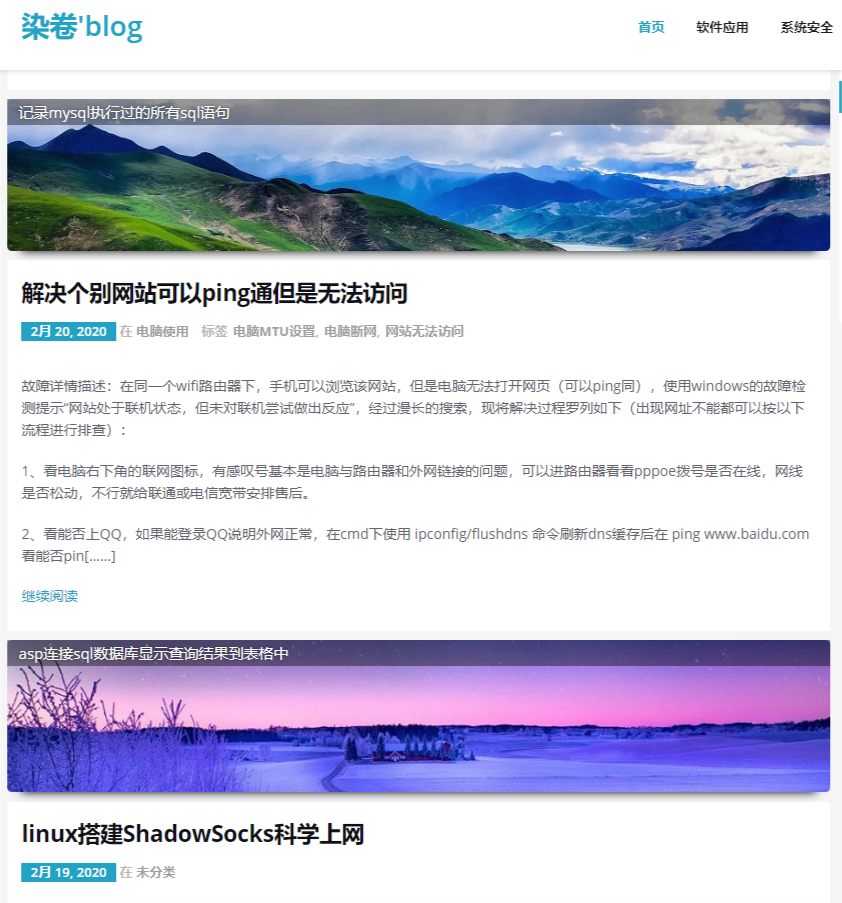
本文的定制修改基于网络教程:https://www.cnblogs.com/wpjamer/articles/6664254.html
一、获取随机文章。使用wordpress内置的文章获取函数实现
<?php$args = array( 'numberposts' => 5, 'orderby' => 'rand', 'post_status' => 'publish' );//numberposts 需要获取的文章数量// orderby 排序方式rand为随机获取//post_status=publish 只获取已经发布的文章!此参数千万不要修改,否则一些草稿及审核中的文章可能也会出现在随机查询的结果中。$rand_posts = get_posts( $args );
二、将随机文章显示在wordpress站点中
编辑wordpress的主题文件,将随机文章布置在合适的位置显示。
<ul><?php$args = array( 'numberposts' => 5, 'orderby' => 'rand', 'post_status' => 'publish' );$rand_posts = get_posts( $args );foreach( $rand_posts as $post ) : ?><li><a href="<?php the_permalink(); ?>"><?php the_title(); ?></a></li><?php endforeach; ?></ul>
三、将随机文章以图片超链接形式展现在文章列表中(主题定制,后期升级主题前最好先备份下,主题升级可能会导致自定义修改被覆盖,如果不熟悉不建议修改)
在主题文件目录下新建文件,wp-content/themes/主题文件名字/rand_post.php
<?php//rand_post.phpclass RandPost{private $arr=array(0,1,2,3,4,5);//用于控制随机输出顺序private $get_times=0; //只有首次使用wordpress的随机文章获取函数private $rand_array = array();public function get_rand_posts(){//随机获取的文章信息 与图片对应绑定if ($this->get_times == 0){//只有第一次会进行绑定//随机文章图片地址$this ->rand_array['pic'][0]='https://www.xxx.com/1.jpg';$this ->rand_array['pic'][1]='https://www.xxx.com/2.jpg';$this ->rand_array['pic'][2]='https://www.xxx.com/3.jpg';$this ->rand_array['pic'][3]='https://www.xxx.com/4.jpg';$this ->rand_array['pic'][4]='https://www.xxx.com/5.jpg';$this ->rand_array['pic'][5]='https://www.xxx.com/6.jpg';$args = array( 'numberposts' => 6, 'orderby' => 'rand', 'post_status' => 'publish' );// wordpress 函数获取随机文章$rand_posts = get_posts( $args );foreach( $rand_posts as $post ) {//the_permalink();//the_title();$this ->rand_array['title'][]=$post->post_name;$this ->rand_array['url'][]=$post ->guid;};++$this->get_times;}}public function show_rand_posts(){$this ->get_rand_posts();// 获取文章 图片绑定关系shuffle($this->arr); //随机打乱顺序$post_arr = $this->rand_array;$rand_num=array_pop($this->arr);//使用 array_pop 删除数组的最后一个元素$rand_num>6?$rand_num=rand(0,5):'';// 默认每页6篇分页文章与 随机文章$rand_pic = $post_arr['pic'][$rand_num];$rand_title = urldecode($post_arr['title'][$rand_num]);$rand_url = $post_arr['url'][$rand_num];echo '<div style="position:relative;"><a href="'.$rand_url.'"><img width="100%" src="'.$rand_pic.'" style="width:100%;margin:10px auto;"/></a><div style="position:absolute;width:100%;z-indent:2;left:0;top:0;"><span class=" rand_title""> '.urldecode($rand_title).'</span></div></div>';//调整文章显示及图片样式}}/*$show = new RandPost();//循环显示文章前初始化$show ->show_rand_posts();//循环中获取随机文章图片展示}*/
rand_title样式文件
<style>.rand_title {display: block;position: float;bottom: 0;width: 100%;box-sizing: border-box;color: #fff;padding: 4px 12px;font-size: 16px;line-height: 20px;background: rgba(0,0,0,.4);text-shadow: 0 0 3px rgba(0,0,0,.5);}</style>
另外需要在 首页、分类、标签、搜索 共4个主题文件进行修改,目录一般位于主题文件夹目录下,这几个文件基本类似,修改的地方都是在while ( have_posts() ) : the_post();这个循环中间。
如果你使用的主题没有这几文件,那么请自行查找需要修改哪些文件,利用好关键字!
wp-content/themes/主题文件名字/index.php 首页wp-content/themes/主题文件名字/archive.php 分类wp-content/themes/主题文件名字/search.php 搜索wp-content/themes/主题文件名字/tag.php 标签
4个php修改方式相同:首先在每个php文件的最顶部引入rang_post.php
<?phpinclude('rand_post.php');$randshow = new RandPost();?>
然后在php文件中找到while ( have_posts() ) : the_post();位置并插入$randshow ->show_rand_posts();进行显示
while ( have_posts() ) : the_post();$randshow ->show_rand_posts();// 这里是需要插入的语句get_template_part( 'content','');endwhile;
这样对wordpress的随机文章显示修改就完成了。如果想要在wordpress每篇文章详情下也加入随机文章推荐,可以自行对主题中的:wp-content/themes/主题文件名字/single.php 文件进行相关修改。

发表评论