本篇目录
目前要实现这个通过浏览器网页地址打开app好像都需要通过按钮手动触发才行,做自动跳转我没成功。安卓端的AndroidManifest.xml需要进行相关配置。
一、新建一个HTML用于打开调用打开安卓app。
其实html端很简单核心只需要一句话就行,其他html代码只是备忘用的。
<a href=”urlopen://ranjuan/card?card_id=828&name=染卷”>打开App </a>
<!DOCTYPE html><html><head><style>a{ font-size:80px;}</style></head><body><meta http-equiv="Content-Type" content="text/html; charset=UTF-8"><span id="device"></span><br><a id="opentest" href="scheme://host/card?card_id=828&name=bluess">打开随便App</a><br><a id="opentest2" href="urlopen://ranjuan/card?card_id=828&name=染卷">打开App</a><br><a id="opentest3" href="urlopen://ranjuanpage/card?card_id=828&name=bluess">打开App子页面</a><br><a href="javascript:open_or_download_app();">打开APP(带超时)</a><br>使用Intent-based URl方法打开安卓app<div><a href=" intent://ranjuan#Intent;scheme=urlopen;action=android.intent.action.VIEW;category=android.intent.category.DEFAULT;category=android.intent.category.BROWSABLE;component=ranjuan/.MainActivity;S.load_url=ranjuan;end">打开app方法二</a><br><a href=" intent://ranjuan/card?card_id=829998&name=bluess#Intent;scheme=urlopen;category=android.intent.category.DEFAULT;category=android.intent.category.BROWSABLE;end">打开app方法2</a><br><a href=" intent://ranjuan/card?card_id=829998&name=bluess&billss=9#Intent;scheme=urlopen;category=android.intent.category.DEFAULT;category=android.intent.category.BROWSABLE;end">打开app方法3</a></div><p id="mod_pop" style="display:none;">请在其他浏览器中打开</p></body><!-- https://blog.csdn.net/qidingquan/article/details/81330489 --><script>function isWeixin() {var ua = navigator.userAgent.toLowerCase(); //获取判断用的对象if (ua.match(/MicroMessenger/i) == "micromessenger") {return true; //微信打开} else {return false; //不是微信打开}}if (isWeixin()) {var modPop = document.getElementById('mod_pop');modPop.style.display = "block";}try{var ua = navigator.userAgent.toLowerCase();//判断是否为移动终端var ismobile = !!ua.match(/AppleWebKit.*Mobile.*/);var reg_str = new RegExp(/AppleWebKit.*Mobile.*/, 'i');ismobile = !!ua.match(reg_str);ismobile = false;//alert(ua);if(ismobile){// alert('shi shouji');//不在微信内置浏览器中时执行if (!(ua.indexOf("MicroMessenger") > 0 || ua.match(/MicroMessenger/i) == "micromessenger")) {var appinfo = "urlopen://ranjuan/card?card_id=828&name=染卷";//拼接唤醒APP参数ichsy_key=2表示APP中打开web页面,注意专题页只能有一个参数if(window.location.href.indexOf("&")==-1){//兼容5.2.8以前版本appinfo += encodeURIComponent("ichsy_key=2&ichsy_value=" + window.location.href);}else{//多参数时appinfo += encodeURIComponent("ichsy_key=5&ichsy_value=" + Base64.base64encode(window.location.href))}window.location.href = appinfo;}}}catch(e){}</script><script>function open_or_download_app() {var device = document.getElementById("device");if (navigator.userAgent.match(/(iPhone|iPod|iPad);?/i)) {device.innerHTML = "ios设备";// 判断useragent,当前设备为ios设备var loadDateTime = new Date();// 设置时间阈值,在规定时间里面没有打开对应App的话,直接去App store进行下载。window.setTimeout(function() {var timeOutDateTime = new Date();if (timeOutDateTime - loadDateTime <2200) {window.location = "http://www.baidu.com/s=ios"; // APP下载地址} else {window.close();}},2000);window.location = "urlopen://ranjuan"; //ios端URL Schema} else if (navigator.userAgent.match(/android/i)) {device.innerHTML = "Android设备";// 判断useragent,当前设备为Android设备// 判断useragent,当前设备为ios设备console.log('is android');// window.location = ww"apptest://appteswwwt"; // Android端URL Schemavar appurl = "urlopen://ranjuan/card?card_id=828&name=染卷";//拼接唤醒APP参数ichsy_key=2表示APP中打开web页面,注意专题页只能有一个参数if(window.location.href.indexOf("&")==-1){//兼容5.2.8以前版本appurl += encodeURIComponent("ichsy_key=2&ichsy_value=" + window.location.href);}else{//多参数时appurl += encodeURIComponent("ichsy_key=5&ichsy_value=" + Base64.base64encode(window.location.href))}window.location = appurl;console.log(appurl);var loadDateTime = new Date();// 设置时间阈值,在规定时间里面没有打开对应App的话,直接去App store进行下载。window.setTimeout(function() {var timeOutDateTime = new Date();if (timeOutDateTime - loadDateTime < 2200) {//window.location.href = appurl;alert('去下载app');window.location = "http://www.baidu.com/s=99"; // APP下载地址} else {window.close();}},2000);}}</script></html>
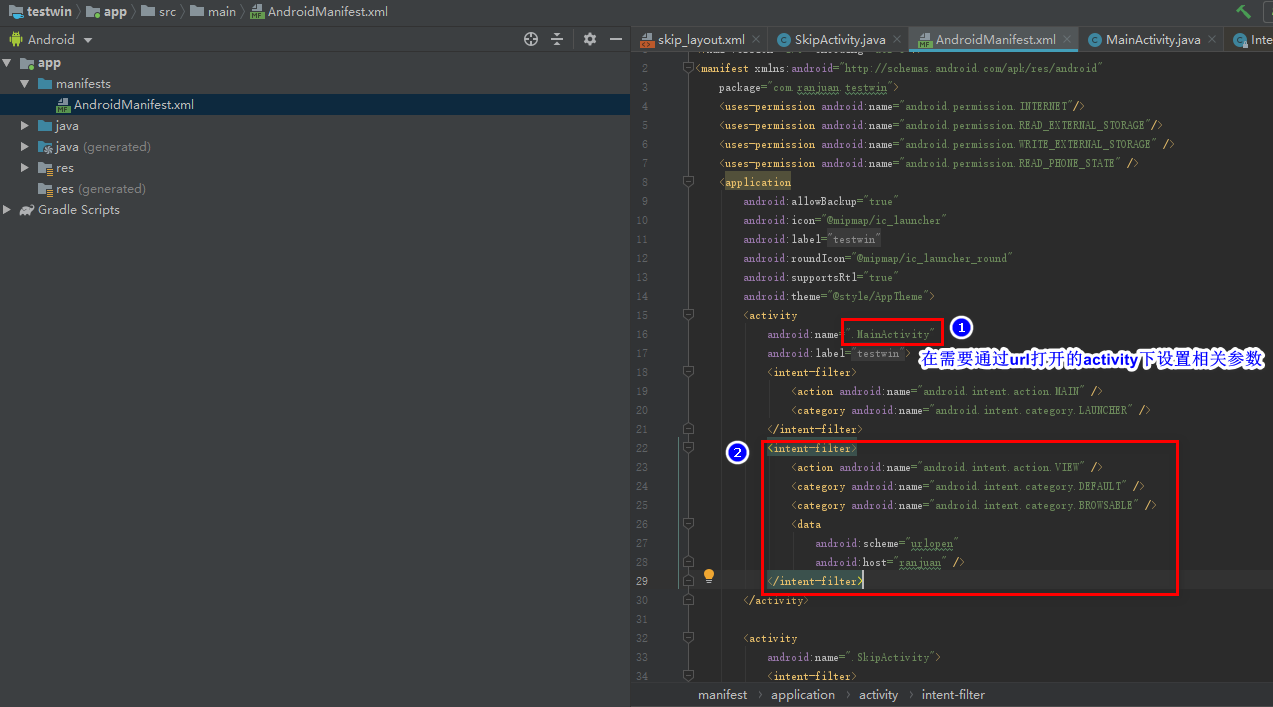
二、修改AndroidManifest.xml中你想要通过url打开的activity的intent-filter配置
注意其中android:scheme=”urlopen”与android:host=”ranjuan”是与你在html代码中写的a标签保持一致
<applicationandroid:allowBackup="true"android:icon="@mipmap/ic_launcher"android:label="@string/app_name"android:roundIcon="@mipmap/ic_launcher_round"android:supportsRtl="true"android:theme="@style/AppTheme"><activityandroid:name=".MainActivity"android:label="@string/app_name"><intent-filter><action android:name="android.intent.action.MAIN" /><category android:name="android.intent.category.LAUNCHER" /></intent-filter><intent-filter><action android:name="android.intent.action.VIEW" /><category android:name="android.intent.category.DEFAULT" /><category android:name="android.intent.category.BROWSABLE" /><dataandroid:scheme="urlopen"android:host="ranjuan" /></intent-filter></activity><activityandroid:name=".SkipActivity"><intent-filter><action android:name="android.intent.action.MAIN" /><category android:name="android.intent.category.LAUNCHER" /></intent-filter><intent-filter><action android:name="android.intent.action.VIEW" /><category android:name="android.intent.category.DEFAULT" /><category android:name="android.intent.category.BROWSABLE" /><dataandroid:scheme="urlopen"android:path="/card"android:host="ranjuanpage" /></intent-filter></activity></application></manifest>
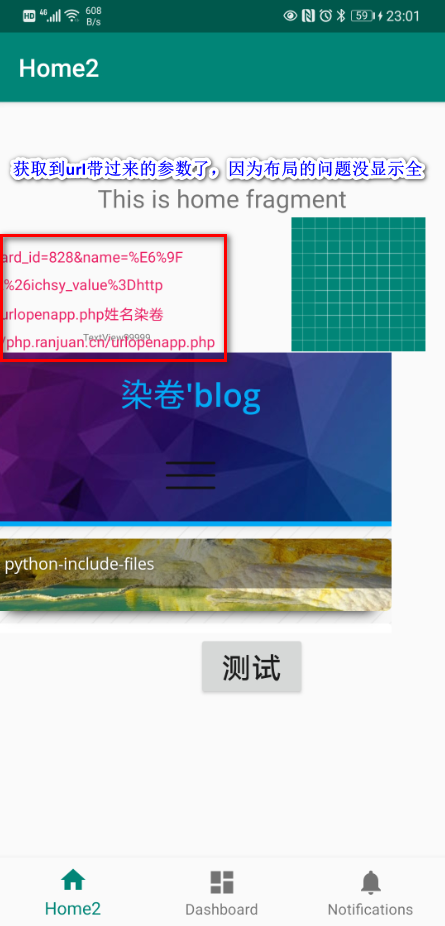
三、接收通过浏览器唤起app时传递过来的参数
在刚才的android:name=”.MainActivity”对应的MainActivity.java文件中进行参数接收。
可能需要先引入相关包,然后在onCreate里面接收参数
import android.content.Intent;
import android.net.Uri;
import android.util.Log;
参考的MainActivity.java代码(有点凌乱,原谅我的不整理):
package com.ranjuan.testwin;import android.os.Bundle;import android.view.View;import android.webkit.WebView;import android.webkit.WebViewClient;import com.google.android.material.bottomnavigation.BottomNavigationView;import androidx.appcompat.app.AppCompatActivity;import androidx.navigation.NavController;import androidx.navigation.Navigation;import androidx.navigation.ui.AppBarConfiguration;import androidx.navigation.ui.NavigationUI;import android.content.Intent;import android.net.Uri;import android.util.Log;import android.widget.TextView;public class MainActivity extends AppCompatActivity {@Overrideprotected void onCreate(Bundle savedInstanceState) {super.onCreate(savedInstanceState);setContentView(R.layout.activity_main);BottomNavigationView navView = findViewById(R.id.nav_view);// Passing each menu ID as a set of Ids because each// menu should be considered as top level destinations.AppBarConfiguration appBarConfiguration = new AppBarConfiguration.Builder(R.id.navigation_home, R.id.navigation_dashboard, R.id.navigation_notifications).build();NavController navController = Navigation.findNavController(this, R.id.nav_host_fragment);NavigationUI.setupActionBarWithNavController(this, navController, appBarConfiguration);NavigationUI.setupWithNavController(navView, navController);//获得控件WebView webView = (WebView) findViewById(R.id.webView);//访问网页webView.loadUrl("https://ranjuan.cn");//系统默认会通过手机浏览器打开网页,为了能够直接通过WebView显示网页,则必须设置webView.setWebViewClient(new WebViewClient(){@Overridepublic boolean shouldOverrideUrlLoading(WebView view, String url) {//使用WebView加载显示urlview.loadUrl(url);//返回truereturn true;//return false;}});//webView.getSettings().setJavaScriptEnabled(true);//webView.loadUrl("loadUrl");Intent intent=getIntent();//Log.d("test",intent.toURI());Log.d("test",intent.toString());Log.e("aaaaaaa","9xx999");Uri uri=intent.getData();if(uri!=null){try {String name=uri.getQueryParameter("name");Log.e("LOG NAME:",name);TextView textView = findViewById(R.id.textView);textView.setText("地址:"+uri.toString()+"姓名"+name);//textView.setText(s);}catch(Exception e){TextView textView = findViewById(R.id.textView);textView.setText("获取异常,没有得到想要的东西");}//打开指定 activity// Intent myintent = new Intent(MainActivity.this,SkipActivity.class);// startActivity(myintent); // 启动目的Activity}}//Uri uri = getIntent().getData();//String test1= uri.getQueryParameter("arg0");//String test2= uri.getQueryParameter("arg1");}
自此通过浏览器地址直接打开安卓app的操作已经结束,下面的内容主要为个人备忘使用,不看也没关系!
另外activity_main.xml文件,因为是测试是随机弄的控件也就顾不上什么界面效果了,有需要的可以看下。
<?xml version="1.0" encoding="utf-8"?><androidx.constraintlayout.widget.ConstraintLayout xmlns:android="http://schemas.android.com/apk/res/android"xmlns:app="http://schemas.android.com/apk/res-auto"xmlns:tools="http://schemas.android.com/tools"android:id="@+id/container"android:layout_width="match_parent"android:layout_height="match_parent"android:paddingTop="?attr/actionBarSize"><com.google.android.material.bottomnavigation.BottomNavigationViewandroid:id="@+id/nav_view"android:layout_width="0dp"android:layout_height="wrap_content"android:layout_marginStart="0dp"android:layout_marginEnd="0dp"android:background="?android:attr/windowBackground"app:layout_constraintBottom_toBottomOf="parent"app:layout_constraintLeft_toLeftOf="parent"app:layout_constraintRight_toRightOf="parent"app:menu="@menu/bottom_nav_menu" /><fragmentandroid:id="@+id/nav_host_fragment"android:name="androidx.navigation.fragment.NavHostFragment"android:layout_width="match_parent"android:layout_height="match_parent"app:defaultNavHost="true"app:layout_constraintBottom_toTopOf="@id/nav_view"app:layout_constraintHorizontal_bias="0.0"app:layout_constraintLeft_toLeftOf="parent"app:layout_constraintRight_toRightOf="parent"app:layout_constraintTop_toTopOf="parent"app:layout_constraintVertical_bias="1.0"app:navGraph="@navigation/mobile_navigation" /><TextViewandroid:id="@+id/textView0"android:layout_width="wrap_content"android:layout_height="wrap_content"android:layout_marginStart="68dp"android:layout_marginLeft="68dp"android:layout_marginTop="128dp"android:text="@string/textview"android:textSize="8sp"app:layout_constraintStart_toStartOf="parent"app:layout_constraintTop_toTopOf="parent" /><TextViewandroid:id="@+id/textView"android:layout_width="wrap_content"android:layout_height="wrap_content"android:layout_marginEnd="168dp"android:layout_marginRight="168dp"android:layout_marginBottom="1dp"android:lineSpacingExtra="8sp"android:onClick="@string/textview"android:text="@string/textview0"android:textColor="#E91E63"android:textSize="12sp"app:layout_constraintBottom_toTopOf="@+id/webView"app:layout_constraintEnd_toEndOf="parent" /><Buttonandroid:id="@+id/button"android:layout_width="wrap_content"android:layout_height="wrap_content"android:layout_marginStart="160dp"android:layout_marginLeft="160dp"android:layout_marginBottom="128dp"android:text="@string/button"android:textSize="24sp"app:layout_constraintBottom_toTopOf="@+id/nav_view"app:layout_constraintStart_toStartOf="parent" /><ImageViewandroid:id="@+id/imageView"android:layout_width="wrap_content"android:layout_height="wrap_content"android:layout_marginEnd="16dp"android:layout_marginRight="2dp"android:layout_marginBottom="1dp"android:contentDescription="TODO"app:layout_constraintBottom_toTopOf="@+id/webView"app:layout_constraintEnd_toEndOf="parent"app:srcCompat="@drawable/ic_launcher_background" /><WebViewandroid:id="@+id/webView"android:layout_width="324dp"android:layout_height="226dp"android:layout_marginEnd="44dp"android:layout_marginRight="44dp"android:layout_marginBottom=".5dp"app:layout_constraintBottom_toTopOf="@+id/button"app:layout_constraintEnd_toEndOf="parent"></WebView></androidx.constraintlayout.widget.ConstraintLayout>
strings.xml文件内容
<resources><string name="app_name">testwin</string><string name="title_home">Home2</string><string name="title_dashboard">Dashboard</string><string name="title_notifications">Notifications</string><string name="textview0">限返满50减20</string><string name="textview">TextView99999</string><string name="button">测试</string></resources>
其他参考教程:
1、https://www.jianshu.com/p/5685b4a1b77e
2、https://blog.csdn.net/ydyww/article/details/81077768

发表评论