本篇目录
SpaceDesk软件可以给windows进行屏幕扩展(将扩展屏幕显示在其他PC电脑或手机上)。起因是我想调研下python是否能实现多屏应用开发,奈何手头只有一个显示器,经过一番折腾终于是使用【SpaceDesk软件+虚拟机/模拟器】解决了,在只有一台电脑&屏幕的情况下测试多屏应用展示效果。
一、SpaceDesk多屏软件使用
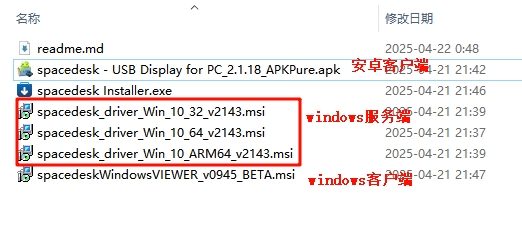
1、软件地址大家网上下载吧,它的windows客户端只要跟 服务端在同一个局域网或可访问网段就可以连接作为副屏使用,安卓端可以通过局域网ip连接电脑,也可以通过usb线连接电脑。
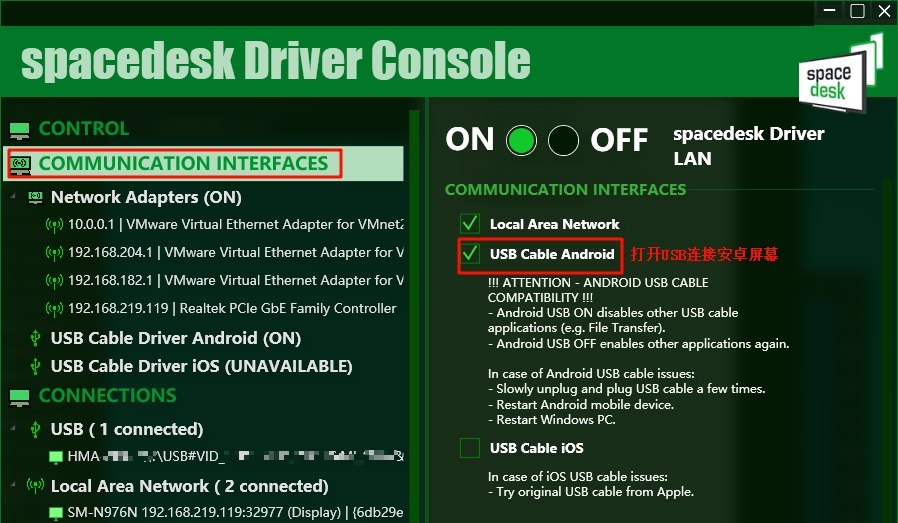
2、如果需要安卓手机通过usb连接电脑作为副屏,记得打开安卓usb开关。打开/关闭时屏幕可能会短暂黑屏。
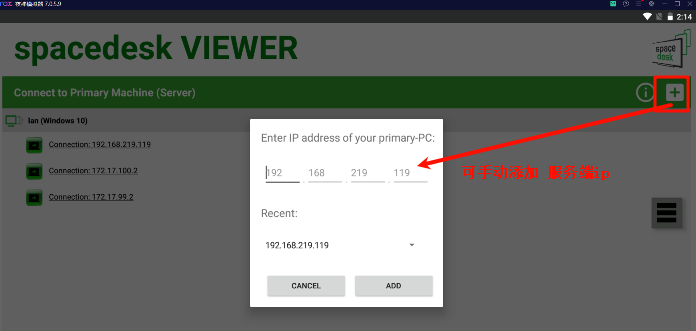
3、在安卓及windwos上安装客户端软件后,可以手动添加 主屏幕所在电脑ip进行添加(如果客户端无法自动扫描到主屏幕电脑ip的话)。我这里同电脑上安卓模拟器及虚拟机下都可以链接成功(手机添加的)。

4、所有副屏连接完毕后,可以在主屏电脑系统设置中设置或检测多屏。
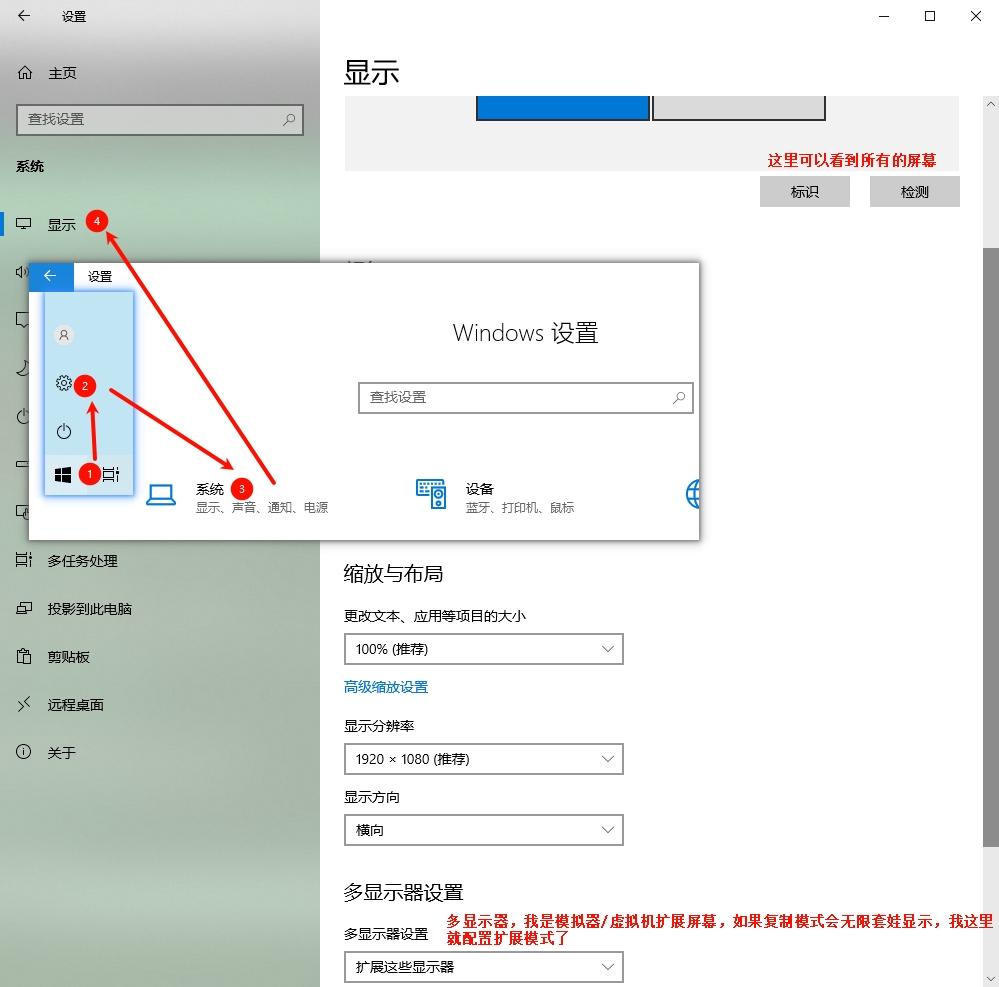

注意:如果你也是通过模拟器或虚拟机来实现多屏,记得看清楚鼠标的位置(因为鼠标可以在多屏之间移动),如果你发现主屏幕上找不到鼠标焦点,可以试着盲拖鼠标,把鼠标往左上角挪,一直挪一直挪最终鼠标会回到默认主屏的左上角,这时就成功找到鼠标了!
二、python实现多屏应用
这个多屏实现demo是问了AI之后整出来的,通过下图可以看到正常识别出了3个屏幕(安卓的usb屏幕我拔线了),而且2个副屏是最大化展示的。

最后贴上代码:
import datetimeimport tkinter as tkimport screeninfoimport threadingimport timeimport ctypesfrom ctypes import wintypesimport pygetwindow as gw# Windows API常量SW_MAXIMIZE = 3HWND_TOP = 0def set_window_maximize_on_monitor(hwnd, monitor):"""使用Windows API将窗口在指定显示器上最大化"""try:user32 = ctypes.windll.user32# 将窗口移动到目标显示器user32.SetWindowPos(hwnd, HWND_TOP,monitor.x, monitor.y,monitor.width, monitor.height, 0)# 最大化窗口user32.ShowWindow(hwnd, SW_MAXIMIZE)return Trueexcept Exception as e:print(f"Windows API调用失败: {e}")return Falsedef create_window_on_monitor_pygetwindow(monitor_index, monitor):"""使用pygetwindow库实现在副屏最大化"""root = tk.Tk()window_title = f"{'主屏幕' if monitor.is_primary else '副屏幕'} {monitor_index + 1}"root.title(window_title)if monitor.is_primary:# 主屏幕:居中显示width, height = 800, 600x = monitor.x + (monitor.width - width) // 2y = monitor.y + (monitor.height - height) // 2root.geometry(f"{width}x{height}+{x}+{y}")bg_color = "lightcoral"else:# 副屏幕:先创建普通窗口,然后最大化到副屏root.geometry("400x300")bg_color = "lightblue"root.configure(bg=bg_color)# 窗口内容title = tk.Label(root, text=window_title, font=("Arial", 18, "bold"), bg=bg_color)title.pack(pady=30)info_text = f"显示器: {monitor.width} x {monitor.height}n位置: ({monitor.x}, {monitor.y})"info_label = tk.Label(root, text=info_text, font=("Arial", 12), bg=bg_color)info_label.pack(pady=10)status_label = tk.Label(root, text="初始化中...", font=("Arial", 10), bg=bg_color)status_label.pack(pady=5)def maximize_on_monitor():"""将窗口最大化到指定显示器"""if monitor.is_primary:returntime.sleep(1) # 等待窗口完全创建try:# 查找当前窗口windows = gw.getWindowsWithTitle(window_title)if windows:win = windows[0]# 移动窗口到目标显示器并最大化win.moveTo(monitor.x, monitor.y)win.resizeTo(monitor.width, monitor.height)win.maximize()status_label.config(text="已最大化在副屏")root.title(f"副屏幕 {monitor_index + 1} - 最大化")else:status_label.config(text="未找到窗口句柄")except Exception as e:status_label.config(text=f"最大化失败: {e}")# 备用方案root.geometry(f"{monitor.width}x{monitor.height}+{monitor.x}+{monitor.y}")# 在副屏上执行最大化if not monitor.is_primary:threading.Thread(target=maximize_on_monitor, daemon=True).start()# 时间显示time_label = tk.Label(root, text="", font=("Arial", 14), bg=bg_color)time_label.pack(pady=10)def update_time():current_time = time.strftime("%H:%M:%S")time_label.config(text=f"时间: {current_time}")root.after(1000, update_time)update_time()root.mainloop()def create_window_on_monitor_winapi(monitor_index, monitor):"""使用Windows API实现在副屏最大化"""root = tk.Tk()root.title(f"{'主屏幕' if monitor.is_primary else '副屏幕'} {monitor_index + 1}")# 初始设置一个较小的窗口root.geometry("400x300")root.configure(bg="lightblue")# 添加内容title_text = f"{'主屏幕' if monitor.is_primary else '副屏幕'} {monitor_index + 1}"title = tk.Label(root, text=title_text, font=("Arial", 16, "bold"), bg="lightblue")title.pack(pady=20)status_label = tk.Label(root, text="正在初始化窗口...", font=("Arial", 12), bg="lightblue")status_label.pack(pady=10)# 获取窗口句柄root.update()hwnd = root.winfo_id()def maximize_on_target_monitor():"""在目标显示器上最大化窗口"""time.sleep(0.5) # 等待窗口创建完成if not monitor.is_primary: # 只在副屏上最大化if set_window_maximize_on_monitor(hwnd, monitor):status_label.config(text=f"已最大化在副屏 {monitor_index + 1}")root.title(f"副屏幕 {monitor_index + 1} - 最大化")else:status_label.config(text="最大化失败,使用备用方案")# 备用方案:手动设置大小和位置root.geometry(f"{monitor.width}x{monitor.height}+{monitor.x}+{monitor.y}")else:# 主屏幕居中显示width, height = 800, 600x = monitor.x + (monitor.width - width) // 2y = monitor.y + (monitor.height - height) // 2root.geometry(f"{width}x{height}+{x}+{y}")status_label.config(text="主屏幕窗口")# 在新线程中执行最大化操作threading.Thread(target=maximize_on_target_monitor, daemon=True).start()# 时间显示time_label = tk.Label(root, text="", font=("Arial", 14), bg="lightblue")time_label.pack(pady=10)def update_time():current_time = time.strftime("%H:%M:%S")time_label.config(text=f"当前时间: {current_time}")root.after(1000, update_time)update_time()# 关闭按钮close_btn = tk.Button(root, text="关闭", command=root.destroy,font=("Arial", 12), bg="white")close_btn.pack(pady=20)root.mainloop()def create_window_manual_maximize(monitor_index, monitor):"""手动设置窗口大小和位置实现副屏'最大化'"""root = tk.Tk()# 设置窗口标题if monitor.is_primary:root.title(f"主屏幕 {monitor_index + 1}")# 主屏幕使用固定大小width, height = 800, 600x = monitor.x + (monitor.width - width) // 2y = monitor.y + (monitor.height - height) // 2bg_color = "lightcoral"else:root.title(f"副屏幕 {monitor_index + 1} - 全屏")# 副屏幕使用整个显示器空间(减去任务栏)width, height = monitor.width, monitor.height - 40 # 减去任务栏高度x, y = monitor.x, monitor.ybg_color = "lightblue"# 移除最大化按钮,因为我们要手动控制root.resizable(False, False)root.geometry(f"{width}x{height}+{x}+{y}")root.configure(bg=bg_color)# 创建主框架main_frame = tk.Frame(root, bg=bg_color)main_frame.pack(fill=tk.BOTH, expand=True, padx=20, pady=20)# 标题title_text = f"{'主屏幕' if monitor.is_primary else '副屏幕(全屏)'} {monitor_index + 1}"title = tk.Label(main_frame, text=title_text,font=("Arial", 24, "bold"), bg=bg_color)title.pack(pady=30)# 显示详细信息info_frame = tk.Frame(main_frame, bg=bg_color)info_frame.pack(pady=20)infos = [f"显示器分辨率: {monitor.width} x {monitor.height}",f"窗口大小: {width} x {height}",f"窗口位置: ({x}, {y})",f"显示器状态: {'主屏幕' if monitor.is_primary else '副屏幕-全屏'}"]for info in infos:label = tk.Label(info_frame, text=info, font=("Arial", 12),bg=bg_color, anchor="w")label.pack(pady=2)# 时间显示time_label = tk.Label(main_frame, text="", font=("Arial", 16), bg=bg_color)time_label.pack(pady=20)def update_time():current_time = time.strftime("%Y-%m-%d %H:%M:%S")time_label.config(text=f"当前时间: {current_time}")root.after(1000, update_time)update_time()# 副屏专属内容if not monitor.is_primary:# 添加画布展示区域canvas_frame = tk.Frame(main_frame, bg=bg_color)canvas_frame.pack(fill=tk.BOTH, expand=True, pady=20)canvas = tk.Canvas(canvas_frame, bg="white", highlightthickness=1,highlightbackground="darkblue")canvas.pack(fill=tk.BOTH, expand=True)def draw_content():canvas.delete("all")canvas_width = canvas.winfo_width()canvas_height = canvas.winfo_height()if canvas_width > 10 and canvas_height > 10:# 绘制网格for i in range(0, canvas_width, 50):canvas.create_line(i, 0, i, canvas_height, fill="lightgray")for i in range(0, canvas_height, 50):canvas.create_line(0, i, canvas_width, i, fill="lightgray")# 绘制中心文本center_x, center_y = canvas_width // 2, canvas_height // 2canvas.create_text(center_x, center_y, text="副屏全屏内容区域",font=("Arial", 20), fill="darkblue")# 绘制边框canvas.create_rectangle(10, 10, canvas_width - 10, canvas_height - 10,outline="darkblue", width=2)canvas.bind("<Configure>", lambda e: draw_content())# 控制按钮button_frame = tk.Frame(main_frame, bg=bg_color)button_frame.pack(side=tk.BOTTOM, pady=20)close_btn = tk.Button(button_frame, text="关闭窗口",command=root.destroy,font=("Arial", 12), bg="white", width=15)close_btn.pack()# 键盘快捷键def on_key_press(event):if event.keysym == 'Escape':root.destroy()root.bind('<KeyPress>', on_key_press)root.focus_set()print(f"窗口 {monitor_index + 1} 已创建在目标显示器上")root.mainloop()def main():"""主函数"""# 安装所需库: pip install screeninfo pygetwindowmonitors = screeninfo.get_monitors()print(f"检测到 {len(monitors)} 个显示器:")for i, monitor in enumerate(monitors):status = "主屏幕" if monitor.is_primary else "副屏幕(将全屏显示)"print(f" {i + 1}. {monitor.width}x{monitor.height} - {status}")if len(monitors) < 2:print("警告: 需要至少两个显示器才能体验完整的多屏效果")# 创建窗口线程threads = []for i, monitor in enumerate(monitors):# 选择其中一种方案(取消注释想要使用的方案):# 方案一: Windows API(需要管理员权限)# thread = threading.Thread(target=create_window_on_monitor_winapi, args=(i, monitor))# 方案二: pygetwindow(推荐)thread = threading.Thread(target=create_window_on_monitor_pygetwindow, args=(i, monitor))# 方案三: 手动设置(最可靠)# thread = threading.Thread(target=create_window_manual_maximize, args=(i, monitor))thread.daemon = Truethread.start()threads.append(thread)print("所有窗口线程已启动...")print("按ESC键关闭窗口")# 等待线程结束for thread in threads:thread.join()if __name__ == "__main__":main()

发表评论