pthon3.8通过import sqlite3模块操作sqlite数据库结果出现报错,网上找了很多包括去下载sqlite3.dll及sqlite3.def到指定dll目录都不行,最后使用import apsw这个模块实现了操作sqlite
C:UsersAdministratorDesktop>python dbmethod.pyTraceback (most recent call last):File "dbmethod.py", line 5, in <module>import sqlite3File "C:UsersAdministratorAppDataLocalProgramsPythonPython38libsqlite3__init__.py", line 23, in <module>from sqlite3.dbapi2 import *File "C:UsersAdministratorAppDataLocalProgramsPythonPython38libsqlite3dbapi2.py", line 27, in <module>from _sqlite3 import *ImportError: DLL load failed while importing _sqlite3: 找不到指定的模块。
上面是报错信息,下面改apsw后也实现了同样的目的(注意连接数据库最好用绝对路径)
import apswimport time#conn=apsw.Connection("mock_data.db")#这里的路径最好用绝对路径!绝对路径!绝对路径!否则可能报错SQLError: no such table: xxxxcurrent_directory = os.path.dirname(os.path.abspath(__file__))conn=apsw.Connection(current_directory+"/mock_data.db")cursor=conn.cursor()create_time=time.strftime('%Y-%m-%d %H:%M:%S',time.localtime(time.time()))url='url'data='data'method='method'remark='666ranjuan.cn'info = (url,data,create_time,method,remark)#例一 往数据库表中添加记录sql = """INSERT INTO apiactions(url,data,create_time,method,remark)VALUES(?,?,?,?,?);"""print(sql)# 执行SQL语句cursor.execute(sql, info)#####附其他代码片段##########例二 查询数据库def selectByCode(data):data =[]# 查询数据库表sql = f"""SELECT *FROM apiactionsWHERE data= '{data}' ORDER BY id desc;"""# print(sql)results = cursor.execute(sql)# 转成元组组成的列表codes = results.fetchall()# """创建数据库表"""def createTable():# 如果表不存在,则创建,表我是用navicat创建的,如果没有数据库可视化管理软件,可以试下这个语句能否创建成功sql = """CREATE TABLE IF NOT EXISTS apiactions (id INTEGER NOT NULL PRIMARY KEY AUTOINCREMENT,url TEXT,data TEXT,create_time TEXT,method TEXT DEFAULT query,remark TEXT);"""# 执行SQL指令cursor.execute(sql)
python操作sqlite的另一个坑
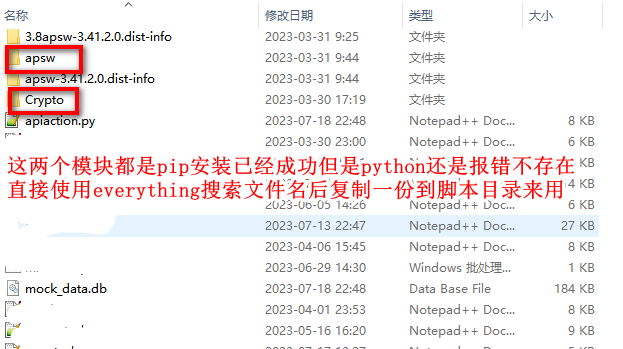
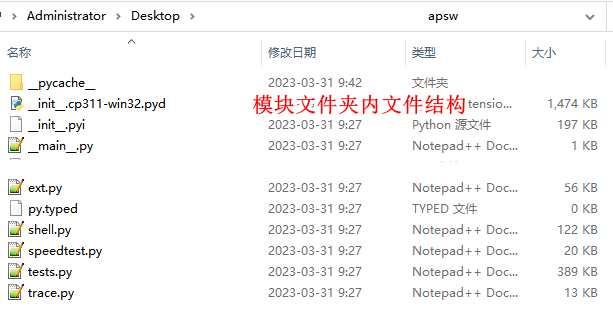
在使用apsw的时候也遇到一些报错,当时忘记具体报错内容了(当然也可能是我安装的python版本太混乱了),最后是直接下载安装apsw模块后放到python脚本所在目录了!如果后面你也遇到明明pip install已经将模块安装成功但是就是报错模块不存在的情况,那么可以尝试将对应模块文件夹整个复制到python脚本所在目录!

发表评论