前端直传文件到OSS的好处是减轻后台服务器的中转压力,但是前往不能使用明文直传的模式,否则可能被盗取appkey和appsecretkey(可参考我之前这篇文章:https://ranjuan.cn/get-aliyun-oss-appkeysecret/)
本文介绍采前端根据从服务器( 后端使用的是php7.1 )获取policy、accessid、signature,直接提交上传到阿里云oss服务器,上传成功后会回调你配置的回调地址,实现后台将oss地址存入数据库的方法。
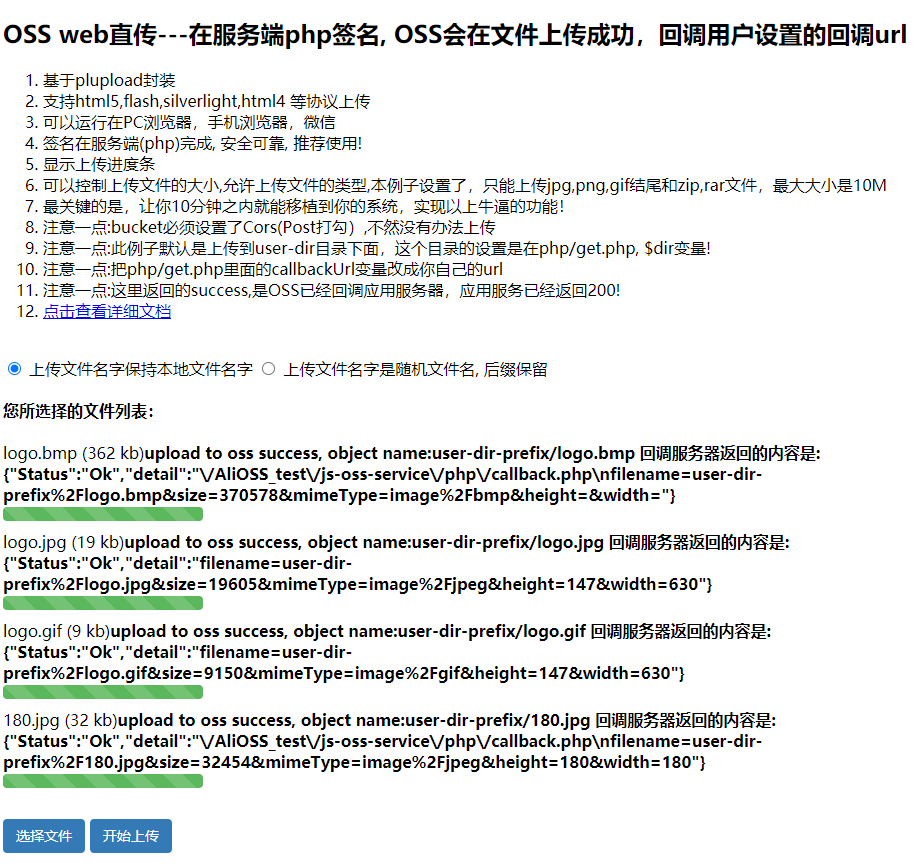
实现的流程大致如下:1、index.html中upload.js --> 访问get.php返回授权票据信息2、upload.js根据返回的信息,直传文件到阿里云oss3、阿里云oss服务器收到请求后,将前端的传过来的文件进行存储,并将一起传过来的callback参数回调到callback.php4、callback.php对回调参数进行解密等处理并返回阿里oss处理结果5、阿里oss将收到的处理结果返回给index.html6、index.html显示上传成功
下面附部分源码:
index.html(http://ranjuan.cn/AliOSS_test/js-oss-service/index.html)
<!DOCTYPE html><html><head><meta http-equiv="content-type" content="text/html; charset=UTF-8"/><title>OSS web直传</title><link rel="stylesheet" type="text/css" href="style.css"/><meta name="viewport" content="width=device-width, initial-scale=1, maximum-scale=1, user-scalable=no"></head><body><h2>OSS web直传---在服务端php签名, OSS会在文件上传成功,回调用户设置的回调url</h2><ol><li>基于plupload封装 </li><li>支持html5,flash,silverlight,html4 等协议上传</li><li>可以运行在PC浏览器,手机浏览器,微信</li><li>签名在服务端(php)完成, 安全可靠, 推荐使用!</li><li>显示上传进度条</li><li>可以控制上传文件的大小,允许上传文件的类型,本例子设置了,只能上传jpg,png,gif结尾和zip,rar文件,最大大小是10M</li><li>最关键的是,让你10分钟之内就能移植到你的系统,实现以上牛逼的功能!</li><li>注意一点:bucket必须设置了Cors(Post打勾),不然没有办法上传</li><li>注意一点:此例子默认是上传到user-dir目录下面,这个目录的设置是在php/get.php, $dir变量!</li><li>注意一点:把php/get.php里面的callbackUrl变量改成你自己的url</li><li>注意一点:这里返回的success,是OSS已经回调应用服务器,应用服务已经返回200!</li><li><a href="https://help.aliyun.com/document_detail/oss/practice/pc_web_upload/js_php_callback.html">点击查看详细文档</a></li></ol><br><form name=theform><input type="radio" name="myradio" value="local_name" checked=true/> 上传文件名字保持本地文件名字<input type="radio" name="myradio" value="random_name" /> 上传文件名字是随机文件名, 后缀保留</form><h4>您所选择的文件列表:</h4><div id="ossfile">你的浏览器不支持flash,Silverlight或者HTML5!</div><br/><div id="container"><a id="selectfiles" href="javascript:void(0);" class='btn'>选择文件</a><a id="postfiles" href="javascript:void(0);" class='btn'>开始上传</a></div><pre id="console"></pre><p> </p></body><script type="text/javascript" src="lib/plupload-2.1.2/js/plupload.full.min.js"></script><script type="text/javascript" src="upload.js"></script><!-- <script type="text/javascript" src="lib/plupload-2.1.2/js/plupload.full.min.js"></script><script type="text/javascript" src="upload.js"></script>--></html>
upload.js
// http://ranjuan.cn/AliOSS_test/js-oss-service/upload.jsaccessid = ''accesskey = ''host = ''policyBase64 = ''signature = ''callbackbody = ''filename = ''key = ''expire = 0g_object_name = ''g_object_name_type = ''now = timestamp = Date.parse(new Date()) / 1000;function send_request(){var xmlhttp = null;if (window.XMLHttpRequest){xmlhttp=new XMLHttpRequest();}else if (window.ActiveXObject){xmlhttp=new ActiveXObject("Microsoft.XMLHTTP");}if (xmlhttp!=null){// serverUrl是 用户获取 '签名和Policy' 等信息的应用服务器的URL,请将下面的IP和Port配置为您自己的真实信息。// serverUrl = 'http://88.88.88.88:8888/aliyun-oss-appserver-php/php/get.php'//serverUrl = './php/get.php'serverUrl = './php/get.php'xmlhttp.open( "GET", serverUrl, false );xmlhttp.send( null );return xmlhttp.responseText}else{alert("Your browser does not support XMLHTTP.");}};//--------function check_object_radio() {var tt = document.getElementsByName('myradio');for (var i = 0; i < tt.length ; i++ ){if(tt[i].checked){g_object_name_type = tt[i].value;break;}}}function get_signature(){// 可以判断当前expire是否超过了当前时间, 如果超过了当前时间, 就重新取一下,3s 作为缓冲。now = timestamp = Date.parse(new Date()) / 1000;if (expire < now + 3){body = send_request()var obj = eval ("(" + body + ")");host = obj['host']policyBase64 = obj['policy']accessid = obj['accessid']signature = obj['signature']expire = parseInt(obj['expire'])callbackbody = obj['callback']key = obj['dir']return true;}return false;};function random_string(len) {len = len || 32;var chars = 'ABCDEFGHJKMNPQRSTWXYZabcdefhijkmnprstwxyz2345678';var maxPos = chars.length;var pwd = '';for (i = 0; i < len; i++) {pwd += chars.charAt(Math.floor(Math.random() * maxPos));}return pwd;}function get_suffix(filename) {pos = filename.lastIndexOf('.')suffix = ''if (pos != -1) {suffix = filename.substring(pos)}return suffix;}function calculate_object_name(filename){if (g_object_name_type == 'local_name'){g_object_name += "${filename}"}else if (g_object_name_type == 'random_name'){suffix = get_suffix(filename)g_object_name = key + random_string(10) + suffix}return ''}function get_uploaded_object_name(filename){if (g_object_name_type == 'local_name'){tmp_name = g_object_nametmp_name = tmp_name.replace("${filename}", filename);return tmp_name}else if(g_object_name_type == 'random_name'){return g_object_name}}function set_upload_param(up, filename, ret){if (ret == false){ret = get_signature()}g_object_name = key;if (filename != '') { suffix = get_suffix(filename)calculate_object_name(filename)}new_multipart_params = {'key' : g_object_name,'policy': policyBase64,'OSSAccessKeyId': accessid,'success_action_status' : '200', //让服务端返回200,不然,默认会返回204'callback' : callbackbody,'signature': signature,};up.setOption({'url': host,'multipart_params': new_multipart_params});up.start();}//-------------var uploader = new plupload.Uploader({// runtimes : 'html5,flash,silverlight,html4',browse_button : 'selectfiles',//multi_selection: false,container: document.getElementById('container'),flash_swf_url : 'lib/plupload-2.1.2/js/Moxie.swf',silverlight_xap_url : 'lib/plupload-2.1.2/js/Moxie.xap',url : 'http://oss.aliyuncs.com',filters: {mime_types : [ //只允许上传图片和zip文件{ title : "Image files", extensions : "jpg,gif,png,bmp" },{ title : "Zip files", extensions : "zip,rar" }],max_file_size : '10mb', //最大只能上传10mb的文件prevent_duplicates : true //不允许选取重复文件}});uploader.init(); //初始uploader.bind('PostInit',function(){// PostInit: function() {document.getElementById('ossfile').innerHTML = '';document.getElementById('postfiles').onclick = function() {// alert('xx');set_upload_param(uploader, '', false);return false;};});uploader.bind('FilesAdded',function(up,files){plupload.each(files, function(file) {document.getElementById('ossfile').innerHTML += '<div id="' + file.id + '">' + file.name + ' (' + plupload.formatSize(file.size) + ')<b></b>'+'<div class="progress"><div class="progress-bar" style="width: 0%"></div></div>'+'</div>';});});uploader.bind('BeforeUpload',function(up,file){check_object_radio();set_upload_param(up, file.name, true);});//绑定文件上传进度事件uploader.bind('UploadProgress',function(up,file){var d = document.getElementById(file.id);d.getElementsByTagName('b')[0].innerHTML = '<span>' + file.percent + "%</span>";var prog = d.getElementsByTagName('div')[0];var progBar = prog.getElementsByTagName('div')[0]progBar.style.width= 2*file.percent+'px';progBar.setAttribute('aria-valuenow', file.percent);});uploader.bind('FileUploaded',function(up,file,info){if (info.status == 200){document.getElementById(file.id).getElementsByTagName('b')[0].innerHTML = 'upload to oss success, object name:' + get_uploaded_object_name(file.name) + ' 回调服务器返回的内容是:' + info.response;}else if (info.status == 203){document.getElementById(file.id).getElementsByTagName('b')[0].innerHTML = '上传到OSS成功,但是oss访问用户设置的上传回调服务器失败,失败原因是:' + info.response;}else{document.getElementById(file.id).getElementsByTagName('b')[0].innerHTML = info.response;}});uploader.bind('Error',function(up,err){// Error: function(up, err) {if (err.code == -600) {document.getElementById('console').appendChild(document.createTextNode("\n选择的文件太大了,可以根据应用情况,在upload.js 设置一下上传的最大大小"));}else if (err.code == -601) {document.getElementById('console').appendChild(document.createTextNode("\n选择的文件后缀不对,可以根据应用情况,在upload.js进行设置可允许的上传文件类型"));}else if (err.code == -602) {document.getElementById('console').appendChild(document.createTextNode("\n这个文件已经上传过一遍了"));}else{ document.getElementById('console').appendChild(document.createTextNode("\nError xml:" + err.response));}});/* }//init shanhuc}); *///uploader.init();
get.php
<?php//get.php//http://ranjuan.cn/AliOSS_test/js-oss-service/php/get.phpfunction gmt_iso8601($time) {$dtStr = date("c", $time);$mydatetime = new DateTime($dtStr);$expiration = $mydatetime->format(DateTime::ISO8601);$pos = strpos($expiration, '+');$expiration = substr($expiration, 0, $pos);return $expiration."Z";}$id= 'LTAI4Fx46XE'; // 请填写您的AccessKeyId。$key= 'zLyQFH8JBtiNfGPdv9T3'; // 请填写您的AccessKeySecret。// $host的格式为 bucketname.endpoint,请替换为您的真实信息。$host = 'https://wodeoss.oss-cn-hangzhou.aliyuncs.com';//echo 'xxxx'; 输出格式不符合预期// $callbackUrl为上传回调服务器的URL,请将下面的IP和Port配置为您自己的真实URL信息。$callbackUrl = 'http://ranjuan.cn/AliOSS_test/js-oss-service/php/callback.php';$dir = 'user-dir-prefix/'; // 用户上传文件时指定的前缀。$callback_param = array('callbackUrl'=>$callbackUrl, 'callbackBody'=>'filename=${object}&size=${size}&mimeType=${mimeType}&height=${imageInfo.height}&width=${imageInfo.width}','callbackBodyType'=>"application/x-www-form-urlencoded");//这里的callbackBody是阿里云回调 传递参数到回调地址-->$callbackUrl//回调信息可根据前端进行一些自定义配置,这样就可以实现后端将上传文件关联id存入数据库!$callback_string = json_encode($callback_param);$base64_callback_body = base64_encode($callback_string);$now = time();$expire = 30; //设置该policy超时时间是10s. 即这个policy过了这个有效时间,将不能访问。$end = $now + $expire;$expiration = gmt_iso8601($end);//最大文件大小.用户可以自己设置$condition = array(0=>'content-length-range', 1=>0, 2=>1048576000);$conditions[] = $condition;// 表示用户上传的数据,必须是以$dir开始,不然上传会失败,这一步不是必须项,只是为了安全起见,防止用户通过policy上传到别人的目录。$start = array(0=>'starts-with', 1=>'$key', 2=>$dir);$conditions[] = $start;$arr = array('expiration'=>$expiration,'conditions'=>$conditions);$policy = json_encode($arr);$base64_policy = base64_encode($policy);$string_to_sign = $base64_policy;$signature = base64_encode(hash_hmac('sha1', $string_to_sign, $key, true));$response = array();$response['accessid'] = $id;$response['host'] = $host;$response['policy'] = $base64_policy;$response['signature'] = $signature;$response['expire'] = $end;$response['callback'] = $base64_callback_body;$response['dir'] = $dir; // 这个参数是设置用户上传文件时指定的前缀。echo json_encode($response);?>
callback.php
<?php//callback.php// http://ranjuan.cn/AliOSS_test/js-oss-service/php/callback.php// 1.获取OSS的签名header和公钥url header$authorizationBase64 = "";$pubKeyUrlBase64 = "";/** 注意:如果要使用HTTP_AUTHORIZATION头,你需要先在apache或者nginx中设置rewrite,以apache为例,修改* 配置文件/etc/httpd/conf/httpd.conf(以你的apache安装路径为准),在DirectoryIndex index.php这行下面增加以下两行RewriteEngine OnRewriteRule .* - [env=HTTP_AUTHORIZATION:%{HTTP:Authorization},last]* */if (isset($_SERVER['HTTP_AUTHORIZATION'])){$authorizationBase64 = $_SERVER['HTTP_AUTHORIZATION'];}if (isset($_SERVER['HTTP_X_OSS_PUB_KEY_URL'])){$pubKeyUrlBase64 = $_SERVER['HTTP_X_OSS_PUB_KEY_URL'];}if ($authorizationBase64 == '' || $pubKeyUrlBase64 == ''){header("http/1.1 403 Forbidden");exit();}// 2.获取OSS的签名$authorization = base64_decode($authorizationBase64);// 3.获取公钥$pubKeyUrl = base64_decode($pubKeyUrlBase64);$ch = curl_init();curl_setopt($ch, CURLOPT_URL, $pubKeyUrl);curl_setopt($ch, CURLOPT_RETURNTRANSFER, 1);curl_setopt($ch, CURLOPT_CONNECTTIMEOUT, 10);$pubKey = curl_exec($ch);if ($pubKey == ""){//header("http/1.1 403 Forbidden");exit();}// 4.获取回调body$body = file_get_contents('php://input');// 5.拼接待签名字符串$authStr = '';$path = $_SERVER['REQUEST_URI'];$pos = strpos($path, '?');if ($pos === false){$authStr = urldecode($path)."\n".$body;}else{$authStr = urldecode(substr($path, 0, $pos)).substr($path, $pos, strlen($path) - $pos)."\n".$body;}// 6.验证签名$ok = openssl_verify($authStr, $authorization, $pubKey, OPENSSL_ALGO_MD5);if ($ok == 1){header("Content-Type: application/json");$data = array("Status"=>"Ok","detail"=>$body);echo json_encode($data);}else{//header("http/1.1 403 Forbidden");exit();}?>

发表评论