现在网络上绝大部分地址选择器都是3级地址选择而且很成熟,4级、5级地址选择基本都是PC端的demo比较多,另外就是绝大部分都是本地地址库,把所有层级地址塞到一起然后来用,使用限制比较大!我理想的地址选择器是什么样呢?
- 首先是要用于移动端网页选择,而且不想做成每个层级选择单独点选
- 考虑到扩展性及数据交互,最好能支持从接口动态获取每个层级的内容
- 支持部分层级结束,也就是说某些选择路径可能到第N个层级就没有下级了(此时还没选到最大层级)
- 最好实现不要太复杂,js实现或可便捷引用实现。
抱着上面的需求,零零散散花费了我6天的时间,可以说是翻遍的百度、bing、掘金、github,最终找到了一个看起来符合需求的项目:https://github.com/huangjieqiu/ajax-picker 最终下载下来后发现距离我想要的效果还有一定差距,后面也没找到其他更贴近的地址选择器源码了,就打算对其进行修改优化(因为项目本身没有什么注释,我又不是专门做前端的,消化了不少时间)。

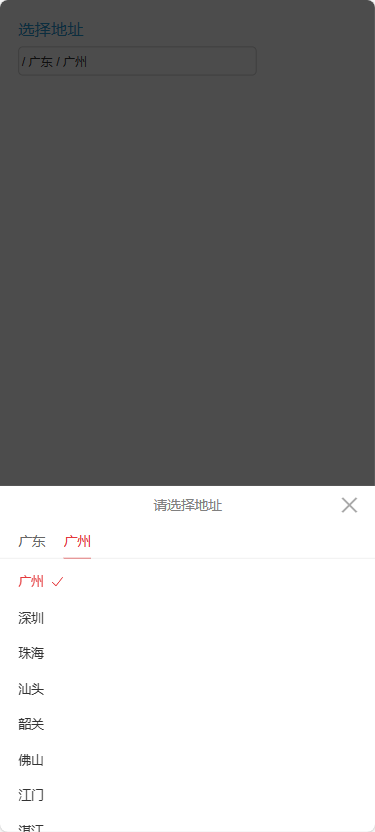
过程不多说下面直接贴源码就3个文件(后面有时间我再传github一份:https://github.com/joolan/ajax-picker-html):
index.html
<!DOCTYPE html><html lang="en"><head><meta charset="UTF-8"><meta name="viewport" content="width=device-width, initial-scale=1.0, maximum-scale=1.0, user-scalable=no"/><meta name="format-detection" content="telephone=no"/><meta name="screen-orientation" content="portrait"><title>address</title></head><style>* {padding: 0;margin: 0;}.input-wrapper {margin: 20px auto auto 20px;}.desc {color: #2599d2;font-size: 18px;margin-bottom: 7px;}.address-input {width: 260px;height: 30px;background: #fff;text-indent: 3px;color: #333;display: inline-block;border-radius: 5px;border: 1px solid #ccc;}</style><body><div class="input-wrapper"><div class="desc">选择地址</div><input type="text" disabled class="address-input" value="/上海/珠海/上海区" id="address-input" placeholder=""></div><div id="container66"></div><script src="./address.js"></script><script src="./ajax-picker.min.js"></script><script>var picker = new AjaxPicker({title: '请选择地址',tipText: ['省份', '城市', '区/县','街道','level4','level5','level6','level7'],//tipText: ['省份', '城市', '区/县','街道','五级地区'],input: 'address-input',container: 'container66',endpoint:0,renderArr: [function () {//可以从接口获取省份; 一级地址必须有picker.render(province)//console.log('用户在列表1 s省份选择了 ' + JSON.stringify(picker.result1))} ,function () {console.log('用户在列表1选择了 ' + JSON.stringify(picker.result1))//可以从接口获取cityif (city.length==0 || picker.result1.value=='北京'){ // 如果是北京,模拟没有下级地址picker.render([])// 如果本层级渲染的是空数据,会自动选择结束}else{picker.render(city)// 如果本层级渲染的有数据,会自动展示选择列表供人选择}},function () {console.log('用户在列表2选择了 ' + JSON.stringify(picker.result2))if (district.length==0|| picker.result2.value=='广州'){picker.render([])}else{picker.render(district)}},function () {console.log('用户在列表3选择了 ' + JSON.stringify(picker.result3))//如果赋值选择列表是空,需要清除下一级选择 并选中上一级if (country.length==0 || picker.result3.value=='越秀区'){picker.render([])}else{picker.render(country)}},function () {console.log('用户在列表4选择了 ' + JSON.stringify(picker.result4))//如果赋值选择列表是空,需要清除下一级选择 并选中上一级if (country.length==0 || picker.result4.value=='越秀区'){picker.render([])}else{picker.render(country)}}],success: function (arr) {console.log('地址选择成功:'+JSON.stringify(arr))var address = ''for (var i = 0; i < arr.length; i++) {address += ' / ' + arr[i].value}document.getElementById('address-input').value = address.substring(1)}})</script></body></html>
ajax-picker.min.js
(function webpackUniversalModuleDefinition(root, factory) {if(typeof exports === 'object' && typeof module === 'object')module.exports = factory();else if(typeof define === 'function' && define.amd)define([], factory);else if(typeof exports === 'object')exports["AjaxPicker"] = factory();elseroot["AjaxPicker"] = factory();})(typeof self !== 'undefined' ? self : this, function() {return /******/ (function(modules) { // webpackBootstrap/******/ // The module cache/******/ var installedModules = {};/******//******/ // The require function/******/ function __webpack_require__(moduleId) {/******//******/ // Check if module is in cache/******/ if(installedModules[moduleId]) {/******/ return installedModules[moduleId].exports;/******/ }/******/ // Create a new module (and put it into the cache)/******/ var module = installedModules[moduleId] = {/******/ i: moduleId,/******/ l: false,/******/ exports: {}/******/ };/******//******/ // Execute the module function/******/ modules[moduleId].call(module.exports, module, module.exports, __webpack_require__);/******//******/ // Flag the module as loaded/******/ module.l = true;/******//******/ // Return the exports of the module/******/ return module.exports;/******/ }/******//******//******/ // expose the modules object (__webpack_modules__)/******/ __webpack_require__.m = modules;/******//******/ // expose the module cache/******/ __webpack_require__.c = installedModules;/******//******/ // define getter function for harmony exports/******/ __webpack_require__.d = function(exports, name, getter) {/******/ if(!__webpack_require__.o(exports, name)) {/******/ Object.defineProperty(exports, name, {/******/ configurable: false,/******/ enumerable: true,/******/ get: getter/******/ });/******/ }/******/ };/******//******/ // getDefaultExport function for compatibility with non-harmony modules/******/ __webpack_require__.n = function(module) {/******/ var getter = module && module.__esModule ?/******/ function getDefault() { return module['default']; } :/******/ function getModuleExports() { return module; };/******/ __webpack_require__.d(getter, 'a', getter);/******/ return getter;/******/ };/******//******/ // Object.prototype.hasOwnProperty.call/******/ __webpack_require__.o = function(object, property) { return Object.prototype.hasOwnProperty.call(object, property); };/******//******/ // __webpack_public_path__/******/ __webpack_require__.p = "";/******//******/ // Load entry module and return exports/******/ return __webpack_require__(__webpack_require__.s = 2);/******/ })/************************************************************************//******/ ([/* 0 *//***/ (function(module, exports) {module.exports = "data:image/png;base64,iVBORw0KGgoAAAANSUhEUgAAACgAAACgCAMAAABJw97qAAAABGdBTUEAALGPC/xhBQAAAAFzUkdCAK7OHOkAAAIlUExURQAAAGZmZmZmZjbCZWZmZmZmZmZmZmZmZmZmZmZmZjbCZWZmZmZmZmZmZmZmZjbCZTbCZWZmZmZmZmZmZmZmZmZmZjbCZWZmZmZmZmZmZmZmZuQ5POQ5PGZmZjbCZWZmZmZmZmZmZuQ5PDbCZTbCZTbCZTbCZTbCZTbCZTbCZTbCZWZmZmZmZmZmZmZmZmZmZmZmZmZmZuQ5POQ5PGZmZuQ5POQ5PGZmZmZmZmZmZuQ5POQ5PGZmZjbCZTbCZTbCZWZmZjbCZWZmZmZmZjbCZWZmZmZmZuQ5POQ5POQ5PGZmZmZmZmZmZmZmZmZmZmZmZmZmZmZmZmZmZjbCZTbCZWZmZmZmZmZmZjbCZWZmZjbCZWZmZmZmZmZmZjbCZWZmZjbCZWZmZjbCZWZmZmZmZmZmZmZmZmZmZuQ5POQ5POQ5POQ5POQ5POQ5POQ5POQ5POQ5POQ5POQ5POQ5POQ5PGZmZuQ5PGZmZmZmZmZmZuQ5POQ5PGZmZmZmZmZmZmZmZmZmZmZmZjbCZWZmZmZmZmZmZjbCZWZmZmZmZuQ5POQ5PGZmZuQ5PGZmZuQ5POQ5POQ5POQ5POQ5PGZmZuQ5POQ5POQ5POQ5PGZmZjbCZeQ5PP///0LGbkPGbzvDae768tfz4Nbz4EHFbdHx3NDx29Py3VnNgM/w2s7w2uf47bvqy9Ty3tXy31jMf0fHckDFbb/szsDsz8Hsz7rqytLx3dv04+n47tKYZ0kAAACYdFJOUwDnKenoAxDqBuvq+S88NwMQkhlMAcYGgZRY9RLOLlh+7MDNrYH67JaSTPmVQ4lR0Nn2BgGA9fxmZ60REyqTlMUFVxHtgFpZD+ovvzb+6ZDDf8UES02uq5PGypGbCAfoVQWDx8f6QZFAxNxfRckdl7F6XZXbED1GV5eWxcxJTlxLxJnEVphKf0/4x79NHn17sjDIszvKfOvRJZKn+AAAA8FJREFUWMPt2OdX1EAQAPAcF8gV7qRKU4qCICDSwYIgTUDFCoJdQURRaYKIvffeJjkBUey9/n0eR8LtJLtx/cbj3Xwht/fjJTuZnfduBGH2RsXpxg2WvDzLhsYrFSYsJGk9TMf6pBCW22MBFJY9VBYcC4aIDaa4ZqBEs1FuA2pk6d0lYEScbr8iC4p47xuBGRtRniV1NcelXlnWxqlLko2A57R/XyuE+qQlSBjQ1iIJGD79RCt90utC7dpaOAHPAyHnS8jBJgJKgCRyIBHwOiCJHDgJ6CRLIUjw3p0BJeRCg5Akb70JObuIZDStItT9IhlLwDNEwn378MpH2to1Au5M1l7hgLpf0V2rLlXtJF92DLsoYnCZSSwnVeKCrGXBGn2JX6a7C8bD1URzTZRjuHmH0e3YTD3ZNXbM7GdZraJyX5WfVe2rNOk+u3KyWqV166TWrJxdQiACMbMi/+YNPtindHK5XqXuNo+rLyoe5HFr+pW7PK6gW7lXwAN7lENreFxXcVE9jztapxzmyvQR5Rjjq87hBOLTMeVIPgMOK/P88rBSd5R1s4QFfnm/qLiL/ViTcoXv6vghpcdsA5oseKh0m2d6+ZR8ovT/K9M+OciT6eWnlGdPlV6ORHul0sdVq8cfP8gPtIBAzJDYu3h7izUtzdqyffFcExaWukiejkWpYSyXuFtGYU2ksjnpsiHS51DcQpkSC42yTKbGKr1bLTNitW6/u1nQivd+VWZGNenmOiji+dvXk38cZOa30NwnzzvfxVYCZlDcuOfjc99VGQEvGtzIuOf1lJPLCeiguF+qkx0EzNS+V78ceeF5pTk5kwLfj302OAS1W3/wjL2Zci/9j0HeulxdG/3hlV43QTi0men0jH73jP3GDqXHn/DRbx7PxFeUga30Vzj6888X5NArFKo5i0IIs7KcI4yzcA0HbBXnUeA/XNzHdbIBWLkawH+0FF+Tytg/2aT2Z5g2qUDM3LBFdkSLTqcY3RFpM5ubFRK/h+2FzLnZCREgd0l2hM0Wkb0kF0A8wZybpbj8n10pAFm0udkyyCuNIleiSuNhmVGehGS3fs2djOYj6vgh3m28jTveMDeToIT24CUg4b0XQkoUDUY14BGJzQ4uespcYCczHwlLWcldqpubJbFgEpqbRcMBFjyIRk0SRLBgBBpeOYFZKzbd3IwTct+aezMm6bmD0sOdcO5XyF0U/GUm1HAWLv9R4D9cQvCQ7rg2AAwFU1MRJ+EGIMUxW0oM2VJiQkybVHib2N4utoXfss3iXvwXjZ9vDw92JzgAAAAASUVORK5CYII="/***/ }),/* 1 *//***/ (function(module, exports) {module.exports = "data:image/gif;base64,R0lGODlhIAAgALMAAP///7Ozs/v7+9bW1uHh4fLy8rq6uoGBgTQ0NAEBARsbG8TExJeXl/39/VRUVAAAACH/C05FVFNDQVBFMi4wAwEAAAAh+QQFBQAAACwAAAAAIAAgAAAE5xDISSlLrOrNp0pKNRCdFhxVolJLEJQUoSgOpSYT4RowNSsvyW1icA16k8MMMRkCBjskBTFDAZyuAEkqCfxIQ2hgQRFvAQEEIjNxVDW6XNE4YagRjuBCwe60smQUDnd4Rz1ZAQZnFAGDd0hihh12CEE9kjAEVlycXIg7BAsMB6SlnJ87paqbSKiKoqusnbMdmDC2tXQlkUhziYtyWTxIfy6BE8WJt5YEvpJivxNaGmLHT0VnOgGYf0dZXS7APdpB309RnHOG5gDqXGLDaC457D1zZ/V/nmOM82XiHQjYKhKP1oZmADdEAAAh+QQFBQAAACwAAAAAGAAXAAAEchDISasKNeuJFKoHs4mUYlJIkmjIV54Soypsa0wmLSnqoTEtBw52mG0AjhYpBxioEqRNy8V0qFzNw+GGwlJki4lBqx1IBgjMkRIghwjrzcDti2/Gh7D9qN774wQGAYOEfwCChIV/gYmDho+QkZKTR3p7EQAh+QQFBQAAACwBAAAAHQAOAAAEchDISWdANesNHHJZwE2DUSEo5SjKKB2HOKGYFLD1CB/DnEoIlkti2PlyuKGEATMBaAACSyGbEDYD4zN1YIEmh0SCQQgYehNmTNNaKsQJXmBuuEYPi9ECAU/UFnNzeUp9VBQEBoFOLmFxWHNoQw6RWEocEQAh+QQFBQAAACwHAAAAGQARAAAEaRDICdZZNOvNDsvfBhBDdpwZgohBgE3nQaki0AYEjEqOGmqDlkEnAzBUjhrA0CoBYhLVSkm4SaAAWkahCFAWTU0A4RxzFWJnzXFWJJWb9pTihRu5dvghl+/7NQmBggo/fYKHCX8AiAmEEQAh+QQFBQAAACwOAAAAEgAYAAAEZXCwAaq9ODAMDOUAI17McYDhWA3mCYpb1RooXBktmsbt944BU6zCQCBQiwPB4jAihiCK86irTB20qvWp7Xq/FYV4TNWNz4oqWoEIgL0HX/eQSLi69boCikTkE2VVDAp5d1p0CW4RACH5BAUFAAAALA4AAAASAB4AAASAkBgCqr3YBIMXvkEIMsxXhcFFpiZqBaTXisBClibgAnd+ijYGq2I4HAamwXBgNHJ8BEbzgPNNjz7LwpnFDLvgLGJMdnw/5DRCrHaE3xbKm6FQwOt1xDnpwCvcJgcJMgEIeCYOCQlrF4YmBIoJVV2CCXZvCooHbwGRcAiKcmFUJhEAIfkEBQUAAAAsDwABABEAHwAABHsQyAkGoRivELInnOFlBjeM1BCiFBdcbMUtKQdTN0CUJru5NJQrYMh5VIFTTKJcOj2HqJQRhEqvqGuU+uw6AwgEwxkOO55lxIihoDjKY8pBoThPxmpAYi+hKzoeewkTdHkZghMIdCOIhIuHfBMOjxiNLR4KCW1ODAlxSxEAIfkEBQUAAAAsCAAOABgAEgAABGwQyEkrCDgbYvvMoOF5ILaNaIoGKroch9hacD3MFMHUBzMHiBtgwJMBFolDB4GoGGBCACKRcAAUWAmzOWJQExysQsJgWj0KqvKalTiYPhp1LBFTtp10Is6mT5gdVFx1bRN8FTsVCAqDOB9+KhEAIfkEBQUAAAAsAgASAB0ADgAABHgQyEmrBePS4bQdQZBdR5IcHmWEgUFQgWKaKbWwwSIhc4LonsXhBSCsQoOSScGQDJiWwOHQnAxWBIYJNXEoFCiEWDI9jCzESey7GwMM5doEwW4jJoypQQ743u1WcTV0CgFzbhJ5XClfHYd/EwZnHoYVDgiOfHKQNREAIfkEBQUAAAAsAAAPABkAEQAABGeQqUQruDjrW3vaYCZ5X2ie6EkcKaooTAsi7ytnTq046BBsNcTvItz4AotMwKZBIC6H6CVAJaCcT0CUBTgaTg5nTCu9GKiDEMPJg5YBBOpwlnVzLwtqyKnZagZWahoMB2M3GgsHSRsRACH5BAUFAAAALAEACAARABgAAARcMKR0gL34npkUyyCAcAmyhBijkGi2UW02VHFt33iu7yiDIDaD4/erEYGDlu/nuBAOJ9Dvc2EcDgFAYIuaXS3bbOh6MIC5IAP5Eh5fk2exC4tpgwZyiyFgvhEMBBEAIfkEBQUAAAAsAAACAA4AHQAABHMQyAnYoViSlFDGXBJ808Ep5KRwV8qEg+pRCOeoioKMwJK0Ekcu54h9AoghKgXIMZgAApQZcCCu2Ax2O6NUud2pmJcyHA4L0uDM/ljYDCnGfGakJQE5YH0wUBYBAUYfBIFkHwaBgxkDgX5lgXpHAXcpBIsRADs="/***/ }),/* 2 *//***/ (function(module, exports, __webpack_require__) {__webpack_require__(3)__webpack_require__(1)__webpack_require__(0)function $id(id) {return document.getElementById(id)}function loop(begin, end, func) {for (var i = begin; i < end; i++) {if (func(i)) break}}var vendor = (function () {var elementStyle = document.createElement('div').stylevar transformNames = {webkit: 'webkitTransform',Moz: 'MozTransform',O: 'OTransform',ms: 'msTransform',standard: 'transform'}for (var key in transformNames) {if (elementStyle[transformNames[key]] !== undefined) {return key}}return false})()function prefixStyle(style) {if (!vendor || vendor === 'standard') {return style}return vendor + style.charAt(0).toLocaleUpperCase() + style.substring(1)}var transform = prefixStyle('transform')var transitionDuration = prefixStyle('transitionDuration')var transitionDelay = prefixStyle('transitionDelay')var DURATION = 300var HEIGHT = 40var WIN_W = window.innerWidthfunction AjaxPicker(config) {this.input = config.inputthis.container = config.containerthis.title = config.titlethis.tipText = config.tipTextthis.renderArr = config.renderArrthis.success = config.successthis.curIdx = 0this.endpoint=0this.renderIdx = 0this.touch = {rect: {}}this.temResults = []this.checkTipText()this.initDom()this.binding()}AjaxPicker.prototype = {constructor: AjaxPicker,checkTipText: function () {if (!this.tipText || !this.tipText.length) {this.tipText = ['请选择']return}this.tipText = [].concat(this.tipText)},initDom: function () {var html = ''html += '<div class="ajaxPicker-wrapper" id="ajaxPicker-wrapper-' + this.container + '">' +'<div class="ajaxPicker-container"><div class="ajaxPicker-title">' +'<div class="ajaxPicker-title-text">' + this.title + '</div>' +'<div class="ajaxPicker-close" id="ajaxPicker-close-' + this.container + '"></div></div>' +'<div class="ajaxPicker-current" id="ajaxPicker-current-' + this.container + '">' +'<ul><li class="ajaxPicker-current-item ajaxPicker-current-on" index="0">' + this.tipText[0] + '</li></ul>' +'<span class="ajaxPicker-current-line" id="ajaxPicker-current-line-' + this.container + '"></span></div>' +'<div class="ajaxPicker-content" id="ajaxPicker-content-' + this.container + '">' +'</div></div></div>'$id(this.container).innerHTML = htmlthis.content = $id('ajaxPicker-content-' + this.container)this.current = $id('ajaxPicker-current-' + this.container).children[0]this.curLine = $id('ajaxPicker-current-line-' + this.container)var list, li, _this = thisloop(1, this.renderArr.length, function (i) {li = document.createElement('li')li.setAttribute('index', i)_this.current.appendChild(li)})loop(0, this.renderArr.length, function (i) {list = document.createElement('div')list.style.width = WIN_W + 'px'list.id = 'ajaxPicker-content-list-' + _this.container + '-' + ilist.className = "ajaxPicker-content-list"list.setAttribute('index', i)list.innerHTML = '<ul></ul><div class="ajaxPicker-loading-wrapper"><div class="ajaxPicker-loading"></div></div>'_this.content.style.width = (WIN_W * (i + 1)) + 'px'_this.content.appendChild(list)})var rect = this.current.children[0].getBoundingClientRect()this.curLine.style.width = rect.width + 'px'this.curLine.style.left = rect.left + 'px'},binding: function () {var html = document.getElementsByTagName('html')[0]var wrapper = $id('ajaxPicker-wrapper-' + this.container)var closeBtn = $id('ajaxPicker-close-' + this.container)var input = $id(this.input)var li, rect, level, index, value, id, siblings, next, renderFn, duration, curChild, left = 0, minLeft = 0, offsetWidth = 0, moveX = 0, moveY = 0, deltaX = 0, deltaY = 0, percent = 0, _this = thiswindow.onresize = function () {var width = 0loop(0, _this.content.children.length, function (i) {_this.content.children[i].style.width = window.innerWidth + 'px'width += window.innerWidth})_this.content.style.width = width + 'px'_this.content.style[transitionDuration] = '0ms'_this.curLine.style[transitionDuration] = '0ms'_this.curLine.style[transitionDelay] = '0ms'_this.content.style[transform] = 'translate3d(-' + (_this.curIdx * window.innerWidth) + 'px, 0, 0)'curChild = _this.current.children[_this.curIdx]rect = curChild.getBoundingClientRect()_this.curLine.style.left = rect.left + 'px'_this.curLine.style.width = rect.width + 'px'_this.curLine.style.bottom = _this.current.clientHeight - (curChild.offsetTop + HEIGHT)}input.addEventListener('touchstart', function () { //地址输入框 点击事件_this.endpoint=0 //不能省略console.log('touchstart667')if ( _this.renderIdx === 0 && !_this.temResults.length) {// 如果页面默认是有多层级地址数据的,想要拉起并渲染,理论是需要在此处理的//但是因为是异步接口获取不同层级的数据,所以处理起来可能并不是那么容易,而且输入框的内容可能完全是与地址无关的数据// 理论上可行的方法// 1、获取地址输入框的地址,进行地址层级截取,分别得到各个层级的名字// 2、 渲染level=0的层级, 然后循环匹配 地址输入框里的第一个层级名字,匹配到的 将其css样式设置为选中// 3、继续渲染level=1的层级……以此类推并处理选择操作,直到渲染到地址输入框的最后一个层级var renderFn = _this.renderArr[0] //这里的逻辑是直接渲染level=0的层级进行展示renderFn()console.log('renderIdx-首次选择 或选择区没有数据')}else{console.log('renderIdx-选择区已有选择数据'+JSON.stringify(_this.temResults))//如果选择区已有选择数据,直接展示级联选择页面(因为之前选择时已经渲染好了,只是选择结束把级联页面隐藏了)}wrapper.classList.add('ajaxPicker-show')html.classList.add('alpha')}, false)wrapper.addEventListener('touchstart', function (e) {//console.log('空白区域不可点-----') //在选择器外空白区域点击return false //不允许,防止选到一半个退出if (e.target === this) {this.classList.remove('ajaxPicker-show')html.classList.remove('alpha')}}, false)closeBtn.addEventListener('touchstart', function () {console.log(_this.temResults)curChild = _this.current.childrenvar address = ''for (var i = 0; i < _this.temResults.length; i++) {address += ' / ' + _this.temResults[i].value}if (curChild[level + 1] && (document.getElementById('address-input').value != address.substring(1))){ //如果存在下级,且当前已选的跟地址输入框不一致时 表示没有选完console.log('你点击了选择器关闭按钮,但是没有选完选项')alert('请填写完整!')return false //不允许,防止选到一半个退出}wrapper.classList.remove('ajaxPicker-show')html.classList.remove('alpha')}, false)this.content.addEventListener('touchstart', function (e) {_this.touch.startX = e.touches[0].clientX_this.touch.startY = e.touches[0].clientY_this.touch.moved = false}, false)this.content.addEventListener('touchmove', function (e) {moveX = e.touches[0].clientXmoveY = e.touches[0].clientYdeltaX = moveX - _this.touch.startXdeltaY = moveY - _this.touch.startYif (Math.abs(deltaY) > Math.abs(deltaX)) returnleft = -(_this.curIdx * WIN_W)minLeft = -(_this.renderIdx * WIN_W)offsetWidth = Math.min(0, Math.max(minLeft, left + deltaX))if (offsetWidth >=0 || offsetWidth <= minLeft) returnif (!_this.touch.moved) _this.touch.moved = truee.preventDefault()this.style[transitionDuration] = '0ms'this.style[transform] = 'translate3d(' + offsetWidth + 'px, 0, 0)'percent = Math.abs(deltaX / WIN_W)_this.touch.targetIdx = (percent >= 0.1) ? (deltaX < 0) ? _this.curIdx + 1 : _this.curIdx - 1 : _this.curIdx_this.touch.rect = _this.current.children[_this.touch.targetIdx].getBoundingClientRect()}, false)this.content.addEventListener('touchend', function () {console.log('touchend1')if (!_this.touch.moved) return_this.changeCurrent({width: _this.touch.rect.width,left: _this.touch.rect.left,bottom: _this.current.clientHeight - (_this.current.children[_this.touch.targetIdx].offsetTop + HEIGHT)}, _this.touch.targetIdx, DURATION, DURATION)}, false)this.current.addEventListener('click', function (e) {console.log('点击了区域层级')if (e.target.tagName.toLowerCase() === 'li') {li = e.targetrect = li.getBoundingClientRect()index = parseInt(li.getAttribute('index'))_this.changeCurrent({width: rect.width,left: rect.left,bottom: _this.current.clientHeight - (li.offsetTop + HEIGHT)}, index, DURATION)}}, false)this.content.addEventListener('click', function (e) {console.log('点击了区域层级 下的 选项 endpoint='+_this.endpoint+ ' _this.temResults='+JSON.stringify(_this.temResults))// 如果当前已经选择的内容,与 输入框的内容一致,则也需要直接退出选择,不能进行下一步的操作if (e.target.tagName.toLowerCase() === 'li' && _this.endpoint==0) {li = e.targetlevel = parseInt(li.getAttribute('level'))index = parseInt(li.getAttribute('index'))id = li.getAttribute('id')value = li.getAttribute('value')if (!li.classList.contains('ajaxPicker-content-on')) {// 如果没有包含任何选中 层级duration = 0siblings = this.children[level].querySelectorAll('li')loop(0, siblings.length, function (i) {siblings[i].classList.remove('ajaxPicker-content-on') //取消当前层级的选中样式})li.classList.add('ajaxPicker-content-on') //添加层级的选中样式_this['result' + (level + 1)] = {value: value,id: id,index: index}_this.temResults.splice(level, 1, {value: value, id: id})while (_this.temResults.length > (level + 1)) {// 选择的结果长度 》 当前层级_this.temResults.pop()}curChild = _this.current.childrenloop(level, curChild.length, function (i) {curChild[i].innerHTML = ''curChild[i].classList.remove('ajaxPicker-current-item', 'ajaxPicker-current-on')})curChild[level].innerHTML = valuecurChild[level].classList.add('ajaxPicker-current-item')if (!curChild[level + 1] || _this.endpoint==1) { //如果不存在下一个层级(tipText里面定义的层级),则返回成功,隐藏拉起的选择框rect = curChild[level].getBoundingClientRect()_this.curLine.style.width = rect.width + 'px'_this.curLine.style.left = rect.left + 'px'_this.curLine.style.bottom = _this.current.clientHeight_this.success(_this.temResults)wrapper.classList.remove('ajaxPicker-show')html.classList.remove('alpha')console.log('A选择中止 this.endpoint='+_this.endpoint+' curChild[level + 1] ='+curChild[level + 1] + ' level='+level)return}curChild[level + 1].innerHTML = _this.tipText[level + 1] || _this.tipText[level] || _this.tipText[0]curChild[level + 1].classList.add('ajaxPicker-current-item', 'ajaxPicker-current-on')this.children[level + 1].querySelector('ul').innerHTML = ''this.children[level + 1].querySelector('.ajaxPicker-loading-wrapper').classList.remove('ajaxPicker-hide')_this.renderIdx = level + 1renderFn = _this.renderArr[level + 1]renderFn()} else {duration = DURATION}if (!curChild[level + 1] || _this.endpoint==1) {wrapper.classList.remove('ajaxPicker-show')html.classList.remove('alpha')console.log('选择中止 this.endpoint='+_this.endpoint+' curChild[level + 1] ='+curChild[level + 1] + ' level='+level)return}//解决 提前结束时, 点击相同的选项导致的加载中问题var address = ''for (var i = 0; i < _this.temResults.length; i++) {address += ' / ' + _this.temResults[i].value}if(document.getElementById('address-input').value == address.substring(1) ){console.log('当前选择是一样的')//this.endpoint=1_this.success(_this.temResults)// 返回成功// var wrapper = $id('ajaxPicker-wrapper-' + _this.container)wrapper.classList.remove('ajaxPicker-show')// this.classList.remove('ajaxPicker-show')//var html = document.getElementsByTagName('html')[0]html.classList.remove('alpha') //如果本层级没有需要渲染的数据,说明只有3级return}//解决 提前结束时, 点击相同的选项导致的加载中问题next = _this.current.children[level + 1]rect = next.getBoundingClientRect()_this.changeCurrent({width: rect.width,left: rect.left,bottom: _this.current.clientHeight - (next.offsetTop + HEIGHT)}, level + 1, duration)}}, false)},changeCurrent: function (rect, idx, dur, delay) {this.curLine.style[transitionDuration] = dur + 'ms'this.curLine.style.width = rect.width + 'px'this.curLine.style.left = rect.left + 'px'this.curLine.style.bottom = rect.bottom + 'px'this.curLine.style[transitionDelay] = (delay || 0) + 'ms'this.content.style[transitionDuration] = DURATION + 'ms'this.content.style[transform] = 'translate3d(' + -(idx * WIN_W) + 'px,' + '0, 0)'this.curIdx = idx},render: function (arr) {console.log('111111')this.endpoint=0 //渲染 表示节点尚未结束var _this = thisif (arr && arr.length) {console.log('获取到render 的入参'+JSON.stringify(arr))var list = $id('ajaxPicker-content-list-' + this.container + '-' + this.renderIdx)var ul = list.querySelector('ul')var html = ''loop(0, arr.length, function (i) {var name = arr[i].name || arr[i].valuevar id = arr[i].idhtml += '<li class="ajaxPicker-content-item" level=' + '"' + _this.renderIdx + '" ' + 'index=' + '"' + i + '" ' + 'value=' + '"' + name + '" ' + 'id=' + '"' + id + '"' + '>' + name + '</li>'})ul.innerHTML = htmllist.children[1].classList.add('ajaxPicker-hide')_this.endpoint=0}else{console.log('error 没有获取到render 的入参')var html = document.getElementsByTagName('html')[0]//在关闭前,还应该处理选择器的四级隐藏,3级激活var wrapper = $id('ajaxPicker-wrapper-' + this.container)wrapper.classList.remove('ajaxPicker-show')// this.classList.remove('ajaxPicker-show')html.classList.remove('alpha') //如果本层级没有需要渲染的数据,说明只有3级//这里应该是把上一层级选择的进行选中状态!/*var list = $id('ajaxPicker-content-list-' + this.container + '-' + (this.renderIdx))var ul = list.querySelector('ul')li = list.children[0].children[1]//level = parseInt(li.getAttribute('level'))li.classList.add('ajaxPicker-content-on') //添加层级的选中样式*/_this.success(_this.temResults)// 返回成功this.current.children[_this.renderIdx-1].classList.add('ajaxPicker-current-item', 'ajaxPicker-current-on')//激活上一层//this.current.children[level].remove()this.current.children[_this.renderIdx].classList.remove('ajaxPicker-current-item', 'ajaxPicker-current-on') //移除下一层级的显示属性_this.endpoint=1return}}}module.exports = AjaxPicker/***/ }),/* 3 *//***/ (function(module, exports, __webpack_require__) {// style-loader: Adds some css to the DOM by adding a <style> tag// load the stylesvar content = __webpack_require__(4);if(typeof content === 'string') content = [[module.i, content, '']];// Prepare cssTransformationvar transform;var options = {"hmr":true}options.transform = transform// add the styles to the DOMvar update = __webpack_require__(7)(content, options);if(content.locals) module.exports = content.locals;// Hot Module Replacementif(false) {// When the styles change, update the <style> tagsif(!content.locals) {module.hot.accept("!!./node_modules/_css-loader@0.28.8@css-loader/index.js!./ajax-picker.css", function() {var newContent = require("!!./node_modules/_css-loader@0.28.8@css-loader/index.js!./ajax-picker.css");if(typeof newContent === 'string') newContent = [[module.id, newContent, '']];update(newContent);});}// When the module is disposed, remove the <style> tagsmodule.hot.dispose(function() { update(); });}/***/ }),/* 4 *//***/ (function(module, exports, __webpack_require__) {var escape = __webpack_require__(5);exports = module.exports = __webpack_require__(6)(false);// imports// moduleexports.push([module.i, "rn.ajaxPicker-wrapper {rn position: fixed;rn top: 0;rn left: 0;rn right: 0;rn bottom: 0;rn background: rgba(0, 0, 0, .7);rn -webkit-transition: all 0.3s;rn -moz-transition: all 0.3s;rn -ms-transition: all 0.3s;rn -o-transition: all 0.3s;rn transition: all 0.3s;rn z-index: -1;rn opacity: 0;rn}rnrn.ajaxPicker-show {rn z-index: 999 !important;rn opacity: 1 !important;rn height: 100% !important;rn overflow: hidden !important;rn}rnrn.ajaxPicker-show .ajaxPicker-container {rn -webkit-transform: translate3d(0, 0, 0);rn -moz-transform: translate3d(0, 0, 0);rn -ms-transform: translate3d(0, 0, 0);rn -o-transform: translate3d(0, 0, 0);rn transform: translate3d(0, 0, 0);rn}rnrn.ajaxPicker-container {rn position: absolute;rn left: 0;rn bottom: 0;rn width: 100%;rn background: #fff;rn -webkit-transition: transform 0.3s;rn -moz-transition: transform 0.3s;rn -ms-transition: transform 0.3s;rn -o-transition: transform 0.3s;rn transition: transform 0.3s;rn -webkit-transform: translate3d(0, 100%, 0);rn -moz-transform: translate3d(0, 100%, 0);rn -ms-transform: translate3d(0, 100%, 0);rn -o-transform: translate3d(0, 100%, 0);rn transform: translate3d(0, 100%, 0);rn z-index: 1000;rn}rnrn.ajaxPicker-title {rn position: relative;rn height: 40px;rn line-height: 40px;rn text-align: center;rn}rnrn.ajaxPicker-title-text {rn font-size: 15px;rn color: #808080;rn}rnrn.ajaxPicker-close {rn position: absolute;rn top: 9px;rn right: 17px;rn height: 22px;rn width: 22px;rn}rnrn.ajaxPicker-close::after, .ajaxPicker-close::before {rn position: absolute;rn content: '';rn left: 0;rn top: 50%;rn background: #a9a9a9;rn height: 2px;rn width: 100%;rn}rnrn.ajaxPicker-close::before {rn -webkit-transform: rotate(45deg);rn -moz-transform: rotate(45deg);rn -ms-transform: rotate(45deg);rn -o-transform: rotate(45deg);rn transform: rotate(45deg);rn}rnrn.ajaxPicker-close::after {rn -webkit-transform: rotate(-45deg);rn -moz-transform: rotate(-45deg);rn -ms-transform: rotate(-45deg);rn -o-transform: rotate(-45deg);rn transform: rotate(-45deg);rn}rnrn.ajaxPicker-current {rn position: relative;rn}rnrn.ajaxPicker-current::after {rn display: block;rn position: absolute;rn left: 0;rn bottom: 0;rn border-top: 1px solid #ddd;rn width: 100%;rn content: ' ';rn}rnrn.ajaxPicker-current ul {rn font-size: 0;rn}rnrn.ajaxPicker-current-item {rn display: inline-block;rn height: 40px;rn line-height: 40px;rn text-align: center;rn font-size: 15px;rn color: #666;rn margin-left: 20px;rn overflow: hidden;rn text-overflow: ellipsis;rn white-space: nowrap;rn max-width: 80%;rn user-select: none;rn -ms-user-select: none;rn -moz-user-select: none;rn -webkit-user-select: none;rn}rnrn.ajaxPicker-current-on {rn color: #e4393c !important;rn}rnrn.ajaxPicker-current-line {rn position: absolute;rn left: 0;rn bottom: 0;rn height: 1px;rn background: #e4393c;rn transition-property: all;rn}rnrn.ajaxPicker-content {rn height: 100%;rn transition-timing-function: ease-in-out;rn}rnrn.ajaxPicker-content-wrapper {rn width: 100%;rn height: 100%;rn}rnrn.ajaxPicker-content-list {rn position: relative;rn float: left;rn overflow: auto;rn height: 300px;rn -webkit-overflow-scrolling: touch;rn overflow-scrolling: touch;rn padding: 5px 20px;rn box-sizing: border-box;rn}rnrn.ajaxPicker-content-item {rn position: relative;rn padding: 10px 0;rn color: #333;rn font-size: 14px;rn width: 100%;rn overflow: hidden;rn text-overflow: ellipsis;rn white-space: nowrap;rn user-select: none;rn -ms-user-select: none;rn -moz-user-select: none;rn -webkit-user-select: none;rn}rnrn.ajaxPicker-content-on {rn color: #e4393c !important;rn}rnrn.ajaxPicker-content-on:after {rn display: inline-block;rn vertical-align: top;rn margin-left: 5px;rn content: ' ';rn width: 20px;rn height: 20px;rn background-image: url(" + escape(__webpack_require__(0)) + ");rn background-repeat: no-repeat;rn background-size: 20px 80px;rn background-position: 0 -20px;rn}rnrn.ajaxPicker-hide {rn display: none !important;rn}rnrn::-webkit-scrollbar {rn display: none;rn}rnrn@media (-webkit-min-device-pixel-ratio: 1.5),(min-device-pixel-ratio: 1.5) {rn .ajaxPicker-current::after {rn -webkit-transform: scaleY(0.7);rn transform: scaleY(0.7);rn }rn}rnrn@media (-webkit-min-device-pixel-ratio: 2),(min-device-pixel-ratio: 2) {rn .ajaxPicker-current::after {rn -webkit-transform: scaleY(0.5);rn transform: scaleY(0.5);rn }rn}rnrn.alpha {rn position: relative;rn height: 100%;rn overflow: hidden;rn}rnrn.alpha body {rn height: 100%;rn overflow: hidden;rn}rnrn/*laoding*/rn.ajaxPicker-loading-wrapper {rn position: absolute;rn top: 50%;rn left: 50%;rn transform: translate(-50%, -50%);rn}rnrn.ajaxPicker-loading {rn width: 32px;rn height: 32px;rn padding: 5px;rn background: rgba(0, 0, 0, 0) url(" + escape(__webpack_require__(1)) + ") no-repeat center;rn border-radius: 5px;rn}", ""]);// exports/***/ }),/* 5 *//***/ (function(module, exports) {module.exports = function escape(url) {// If url is already wrapped in quotes, remove themif (/^['"].*['"]$/.test(url)) {url = url.slice(1, -1);}// Should url be wrapped?// See https://drafts.csswg.org/css-values-3/#urlsif (/["'() tn]/.test(url)) {return '"' + url.replace(/"/g, '\"').replace(/n/g, '\n') + '"'}return url}/***/ }),/* 6 *//***/ (function(module, exports) {/*MIT License http://www.opensource.org/licenses/mit-license.phpAuthor Tobias Koppers @sokra*/// css base code, injected by the css-loadermodule.exports = function(useSourceMap) {var list = [];// return the list of modules as css stringlist.toString = function toString() {return this.map(function (item) {var content = cssWithMappingToString(item, useSourceMap);if(item[2]) {return "@media " + item[2] + "{" + content + "}";} else {return content;}}).join("");};// import a list of modules into the listlist.i = function(modules, mediaQuery) {if(typeof modules === "string")modules = [[null, modules, ""]];var alreadyImportedModules = {};for(var i = 0; i < this.length; i++) {var id = this[i][0];if(typeof id === "number")alreadyImportedModules[id] = true;}for(i = 0; i < modules.length; i++) {var item = modules[i];// skip already imported module// this implementation is not 100% perfect for weird media query combinations// when a module is imported multiple times with different media queries.// I hope this will never occur (Hey this way we have smaller bundles)if(typeof item[0] !== "number" || !alreadyImportedModules[item[0]]) {if(mediaQuery && !item[2]) {item[2] = mediaQuery;} else if(mediaQuery) {item[2] = "(" + item[2] + ") and (" + mediaQuery + ")";}list.push(item);}}};return list;};function cssWithMappingToString(item, useSourceMap) {var content = item[1] || '';var cssMapping = item[3];if (!cssMapping) {return content;}if (useSourceMap && typeof btoa === 'function') {var sourceMapping = toComment(cssMapping);var sourceURLs = cssMapping.sources.map(function (source) {return '/*# sourceURL=' + cssMapping.sourceRoot + source + ' */'});return [content].concat(sourceURLs).concat([sourceMapping]).join('n');}return [content].join('n');}// Adapted from convert-source-map (MIT)function toComment(sourceMap) {// eslint-disable-next-line no-undefvar base64 = btoa(unescape(encodeURIComponent(JSON.stringify(sourceMap))));var data = 'sourceMappingURL=data:application/json;charset=utf-8;base64,' + base64;return '/*# ' + data + ' */';}/***/ }),/* 7 *//***/ (function(module, exports, __webpack_require__) {/*MIT License http://www.opensource.org/licenses/mit-license.phpAuthor Tobias Koppers @sokra*/var stylesInDom = {};var memoize = function (fn) {var memo;return function () {if (typeof memo === "undefined") memo = fn.apply(this, arguments);return memo;};};var isOldIE = memoize(function () {// Test for IE <= 9 as proposed by Browserhacks// @see http://browserhacks.com/#hack-e71d8692f65334173fee715c222cb805// Tests for existence of standard globals is to allow style-loader// to operate correctly into non-standard environments// @see https://github.com/webpack-contrib/style-loader/issues/177return window && document && document.all && !window.atob;});var getElement = (function (fn) {var memo = {};return function(selector) {if (typeof memo[selector] === "undefined") {var styleTarget = fn.call(this, selector);// Special case to return head of iframe instead of iframe itselfif (styleTarget instanceof window.HTMLIFrameElement) {try {// This will throw an exception if access to iframe is blocked// due to cross-origin restrictionsstyleTarget = styleTarget.contentDocument.head;} catch(e) {styleTarget = null;}}memo[selector] = styleTarget;}return memo[selector]};})(function (target) {return document.querySelector(target)});var singleton = null;var singletonCounter = 0;var stylesInsertedAtTop = [];var fixUrls = __webpack_require__(8);module.exports = function(list, options) {if (typeof DEBUG !== "undefined" && DEBUG) {if (typeof document !== "object") throw new Error("The style-loader cannot be used in a non-browser environment");}options = options || {};options.attrs = typeof options.attrs === "object" ? options.attrs : {};// Force single-tag solution on IE6-9, which has a hard limit on the # of <style>// tags it will allow on a pageif (!options.singleton && typeof options.singleton !== "boolean") options.singleton = isOldIE();// By default, add <style> tags to the <head> elementif (!options.insertInto) options.insertInto = "head";// By default, add <style> tags to the bottom of the targetif (!options.insertAt) options.insertAt = "bottom";var styles = listToStyles(list, options);addStylesToDom(styles, options);return function update (newList) {var mayRemove = [];for (var i = 0; i < styles.length; i++) {var item = styles[i];var domStyle = stylesInDom[item.id];domStyle.refs--;mayRemove.push(domStyle);}if(newList) {var newStyles = listToStyles(newList, options);addStylesToDom(newStyles, options);}for (var i = 0; i < mayRemove.length; i++) {var domStyle = mayRemove[i];if(domStyle.refs === 0) {for (var j = 0; j < domStyle.parts.length; j++) domStyle.parts[j]();delete stylesInDom[domStyle.id];}}};};function addStylesToDom (styles, options) {for (var i = 0; i < styles.length; i++) {var item = styles[i];var domStyle = stylesInDom[item.id];if(domStyle) {domStyle.refs++;for(var j = 0; j < domStyle.parts.length; j++) {domStyle.parts[j](item.parts[j]);}for(; j < item.parts.length; j++) {domStyle.parts.push(addStyle(item.parts[j], options));}} else {var parts = [];for(var j = 0; j < item.parts.length; j++) {parts.push(addStyle(item.parts[j], options));}stylesInDom[item.id] = {id: item.id, refs: 1, parts: parts};}}}function listToStyles (list, options) {var styles = [];var newStyles = {};for (var i = 0; i < list.length; i++) {var item = list[i];var id = options.base ? item[0] + options.base : item[0];var css = item[1];var media = item[2];var sourceMap = item[3];var part = {css: css, media: media, sourceMap: sourceMap};if(!newStyles[id]) styles.push(newStyles[id] = {id: id, parts: [part]});else newStyles[id].parts.push(part);}return styles;}function insertStyleElement (options, style) {var target = getElement(options.insertInto)if (!target) {throw new Error("Couldn't find a style target. This probably means that the value for the 'insertInto' parameter is invalid.");}var lastStyleElementInsertedAtTop = stylesInsertedAtTop[stylesInsertedAtTop.length - 1];if (options.insertAt === "top") {if (!lastStyleElementInsertedAtTop) {target.insertBefore(style, target.firstChild);} else if (lastStyleElementInsertedAtTop.nextSibling) {target.insertBefore(style, lastStyleElementInsertedAtTop.nextSibling);} else {target.appendChild(style);}stylesInsertedAtTop.push(style);} else if (options.insertAt === "bottom") {target.appendChild(style);} else if (typeof options.insertAt === "object" && options.insertAt.before) {var nextSibling = getElement(options.insertInto + " " + options.insertAt.before);target.insertBefore(style, nextSibling);} else {throw new Error("[Style Loader]nn Invalid value for parameter 'insertAt' ('options.insertAt') found.n Must be 'top', 'bottom', or Object.n (https://github.com/webpack-contrib/style-loader#insertat)n");}}function removeStyleElement (style) {if (style.parentNode === null) return false;style.parentNode.removeChild(style);var idx = stylesInsertedAtTop.indexOf(style);if(idx >= 0) {stylesInsertedAtTop.splice(idx, 1);}}function createStyleElement (options) {var style = document.createElement("style");options.attrs.type = "text/css";addAttrs(style, options.attrs);insertStyleElement(options, style);return style;}function createLinkElement (options) {var link = document.createElement("link");options.attrs.type = "text/css";options.attrs.rel = "stylesheet";addAttrs(link, options.attrs);insertStyleElement(options, link);return link;}function addAttrs (el, attrs) {Object.keys(attrs).forEach(function (key) {el.setAttribute(key, attrs[key]);});}function addStyle (obj, options) {var style, update, remove, result;// If a transform function was defined, run it on the cssif (options.transform && obj.css) {result = options.transform(obj.css);if (result) {// If transform returns a value, use that instead of the original css.// This allows running runtime transformations on the css.obj.css = result;} else {// If the transform function returns a falsy value, don't add this css.// This allows conditional loading of cssreturn function() {// noop};}}if (options.singleton) {var styleIndex = singletonCounter++;style = singleton || (singleton = createStyleElement(options));update = applyToSingletonTag.bind(null, style, styleIndex, false);remove = applyToSingletonTag.bind(null, style, styleIndex, true);} else if (obj.sourceMap &&typeof URL === "function" &&typeof URL.createObjectURL === "function" &&typeof URL.revokeObjectURL === "function" &&typeof Blob === "function" &&typeof btoa === "function") {style = createLinkElement(options);update = updateLink.bind(null, style, options);remove = function () {removeStyleElement(style);if(style.href) URL.revokeObjectURL(style.href);};} else {style = createStyleElement(options);update = applyToTag.bind(null, style);remove = function () {removeStyleElement(style);};}update(obj);return function updateStyle (newObj) {if (newObj) {if (newObj.css === obj.css &&newObj.media === obj.media &&newObj.sourceMap === obj.sourceMap) {return;}update(obj = newObj);} else {remove();}};}var replaceText = (function () {var textStore = [];return function (index, replacement) {textStore[index] = replacement;return textStore.filter(Boolean).join('n');};})();function applyToSingletonTag (style, index, remove, obj) {var css = remove ? "" : obj.css;if (style.styleSheet) {style.styleSheet.cssText = replaceText(index, css);} else {var cssNode = document.createTextNode(css);var childNodes = style.childNodes;if (childNodes[index]) style.removeChild(childNodes[index]);if (childNodes.length) {style.insertBefore(cssNode, childNodes[index]);} else {style.appendChild(cssNode);}}}function applyToTag (style, obj) {var css = obj.css;var media = obj.media;if(media) {style.setAttribute("media", media)}if(style.styleSheet) {style.styleSheet.cssText = css;} else {while(style.firstChild) {style.removeChild(style.firstChild);}style.appendChild(document.createTextNode(css));}}function updateLink (link, options, obj) {var css = obj.css;var sourceMap = obj.sourceMap;/*If convertToAbsoluteUrls isn't defined, but sourcemaps are enabledand there is no publicPath defined then lets turn convertToAbsoluteUrlson by default. Otherwise default to the convertToAbsoluteUrls optiondirectly*/var autoFixUrls = options.convertToAbsoluteUrls === undefined && sourceMap;if (options.convertToAbsoluteUrls || autoFixUrls) {css = fixUrls(css);}if (sourceMap) {// http://stackoverflow.com/a/26603875css += "n/*# sourceMappingURL=data:application/json;base64," + btoa(unescape(encodeURIComponent(JSON.stringify(sourceMap)))) + " */";}var blob = new Blob([css], { type: "text/css" });var oldSrc = link.href;link.href = URL.createObjectURL(blob);if(oldSrc) URL.revokeObjectURL(oldSrc);}/***/ }),/* 8 *//***/ (function(module, exports) {/*** When source maps are enabled, `style-loader` uses a link element with a data-uri to* embed the css on the page. This breaks all relative urls because now they are relative to a* bundle instead of the current page.** One solution is to only use full urls, but that may be impossible.** Instead, this function "fixes" the relative urls to be absolute according to the current page location.** A rudimentary test suite is located at `test/fixUrls.js` and can be run via the `npm test` command.**/module.exports = function (css) {// get current locationvar location = typeof window !== "undefined" && window.location;if (!location) {throw new Error("fixUrls requires window.location");}// blank or null?if (!css || typeof css !== "string") {return css;}var baseUrl = location.protocol + "//" + location.host;var currentDir = baseUrl + location.pathname.replace(//[^/]*$/, "/");// convert each url(...)/*This regular expression is just a way to recursively match brackets withina string./urls*( = Match on the word "url" with any whitespace after it and then a parens( = Start a capturing group(?: = Start a non-capturing group[^)(] = Match anything that isn't a parentheses| = OR( = Match a start parentheses(?: = Start another non-capturing groups[^)(]+ = Match anything that isn't a parentheses| = OR( = Match a start parentheses[^)(]* = Match anything that isn't a parentheses) = Match a end parentheses) = End Group*) = Match anything and then a close parens) = Close non-capturing group* = Match anything) = Close capturing group) = Match a close parens/gi = Get all matches, not the first. Be case insensitive.*/var fixedCss = css.replace(/urls*(((?:[^)(]|((?:[^)(]+|([^)(]*))*))*))/gi, function(fullMatch, origUrl) {// strip quotes (if they exist)var unquotedOrigUrl = origUrl.trim().replace(/^"(.*)"$/, function(o, $1){ return $1; }).replace(/^'(.*)'$/, function(o, $1){ return $1; });// already a full url? no changeif (/^(#|data:|http://|https://|file:///)/i.test(unquotedOrigUrl)) {return fullMatch;}// convert the url to a full urlvar newUrl;if (unquotedOrigUrl.indexOf("//") === 0) {//TODO: should we add protocol?newUrl = unquotedOrigUrl;} else if (unquotedOrigUrl.indexOf("/") === 0) {// path should be relative to the base urlnewUrl = baseUrl + unquotedOrigUrl; // already starts with '/'} else {// path should be relative to current directorynewUrl = currentDir + unquotedOrigUrl.replace(/^.//, ""); // Strip leading './'}// send back the fixed url(...)return "url(" + JSON.stringify(newUrl) + ")";});// send back the fixed cssreturn fixedCss;};/***/ })/******/ ]);});
address.js 地址数据测试用,实际可以在index.html中自己去写接口调用数据的逻辑。
/*** Created by appian on 2016/11/7.*//* eslint-disable */var province = [{"name": "北京","id": 0},{"name": "广东","id": 0},{"name": "上海","id": 0},{"name": "天津","id": 0},{"name": "重庆","id": 0},{"name": "辽宁","id": 1},{"name": "江苏","id": 1},{"name": "湖北","id": 1},{"name": "四川","id": 1},{"name": "陕西","id": 1},{"name": "河北","id": 1},{"name": "山西","id": 1},{"name": "河南","id": 1},{"name": "吉林","id": 1},{"name": "黑龙江","id": 1},{"name": "内蒙古","id": 1},{"name": "山东","id": 1},{"name": "安徽","id": 1},{"name": "浙江","id": 1},{"name": "福建","id": 1},{"name": "湖南","id": 1},{"name": "广西","id": 1},{"name": "江西","id": 1},{"name": "贵州","id": 1},{"name": "云南","id": 1},{"name": "西藏","id": 1},{"name": "海南","id": 1},{"name": "甘肃","id": 1},{"name": "宁夏","id": 1},{"name": "青海","id": 1},{"name": "新疆","id": 1},{"name": "香港","id": 0},{"name": "澳门","id": 0},{"name": "台湾","id": 0},{"name": "海外","id": 0},{"name": "其他"}]var city = [{"name": "广州","id": 0},{"name": "深圳","id": 0},{"name": "珠海","id": 0},{"name": "汕头","id": 0},{"name": "韶关","id": 0},{"name": "佛山","id": 0},{"name": "江门","id": 0},{"name": "湛江","id": 0},{"name": "茂名","id": 0},{"name": "肇庆","id": 0},{"name": "惠州","id": 0},{"name": "梅州","id": 0},{"name": "汕尾","id": 0},{"name": "河源","id": 0},{"name": "阳江","id": 0},{"name": "清远","id": 0},{"name": "东莞","id": 0},{"name": "中山","id": 0},{"name": "潮州","id": 0},{"name": "揭阳","id": 0},{"name": "云浮","id": 0}]var district = [{"name": "越秀区",id: 0},{"name": "荔湾区",id: 0},{"name": "海珠区",id: 0},{"name": "天河区",id: 0},{"name": "白云区",id: 0},{"name": "黄埔区",id: 0},{"name": "番禺区",id: 0},{"name": "花都区",id: 0},{"name": "南沙区",id: 0},{"name": "萝岗区",id: 0},{"name": "增城市",id: 0},{"name": "从化市",id: 0},{"name": "其他",id: 0}]var country1 = []var country = [{"name": "xx街道",id: 0},{"name": "aa街道",id: 0}]

2 条评论
能不能给默认值呢,比如修改地址时,每级中都有个默认选中的
不好意思前端我也不是特别熟悉,在文章中ajax-picker.min.js这个源码的第234行有写可能可行的处理方式。